
The parts that bring you calls are staying. The part that needs your attention is smaller than the email made it sound. This is a plain guide to what is happening, what it changes, and the steps to take.
For most HVAC contractors, Local Service Ads are the highest-intent leads in the mix, which is why this move is worth ten minutes of your time.
What is Google Changing About Local Service Ads?
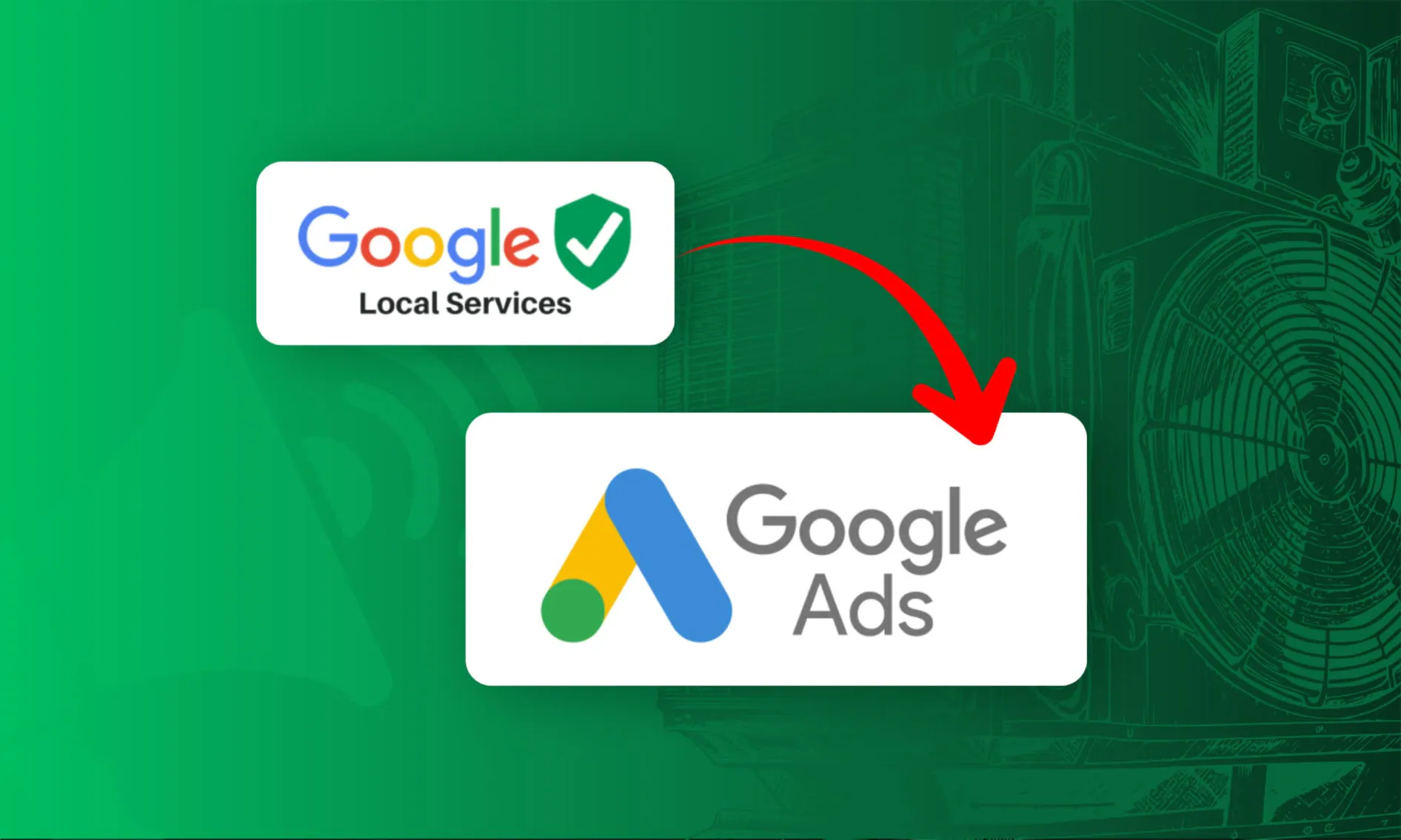
Google is retiring the standalone Local Service Ads dashboard, the screen you use to see leads and set your budget.
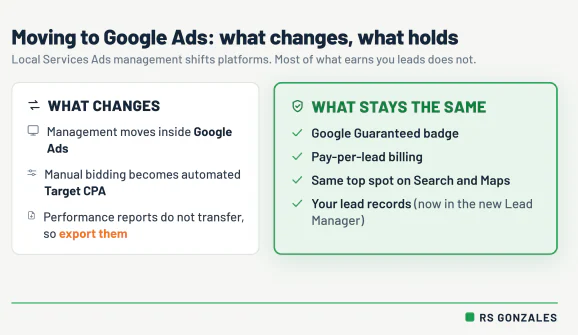
Your Local Service Ads become a pay-per-lead campaign inside Google Ads, the same platform contractors already use to run Search ads. You pay only when a homeowner contacts you, not per click, and in your account it shows up under the Performance Max name, built for pay-per-lead. Do not let the label rattle you; it still runs only on Search and Maps.
The first phase started in August 2026 with home service trades in the United States, HVAC included, and expands to the rest of the country through late 2026 and to non-US accounts in 2027. It happens account by account, so your own migration date may still be a few weeks out.
Google’s reason for the move is consolidation: every ad product managed in one system instead of a separate login for LSAs. For you, that means the buttons move and one part of how the account is priced changes. It does not mean your leads stop or your badge disappears.
Here is the before-and-after.
| Part of your LSA setup | Before | After the move |
|---|---|---|
| Where you manage it | Standalone LSA dashboard | Inside Google Ads |
| How you set your price | Manual, you set it | Automated Target CPA (explained below) |
| How you pay | Per lead | Per lead, unchanged |
| Google Guaranteed badge | Active | Carries over, no action needed |
| Lead history | In the LSA dashboard | Lead records carry over to the new Lead Manager; performance reports do not, export those first |
These all move over on their own, with your lead records landing in a new Lead Manager.
- Your Google Guaranteed badge (the green checkmark that shows Google verified your license and insurance)
- Your pay-per-lead pricing
- Your past billing
- Your call and message records
Only one thing needs action from you: your performance reports. The aggregate performance reports do not follow. Export those before your account migrates, because you will not get them back.
How This Change Affects Leads and Costs For HVAC Contractors
The move itself is mostly cosmetic. Two things underneath it are not, and both touch what you pay for a lead.
“The platform is about to gouge me” is the first thought most owners have when Google changes anything about pricing. That is not what is happening here. What is changing is who sets the price and how, which matters more than the sticker.
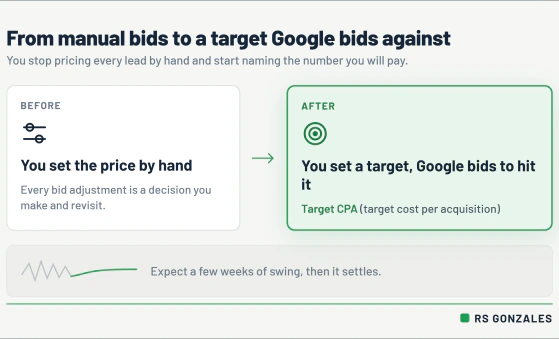
- A machine sets your bid now, not you. The old dashboard let you set your price per lead by hand. The new setup uses Target CPA, short for target cost per acquisition: you tell Google the average you are willing to pay for a lead, and it bids automatically to hit that. You still own the number; you set it once instead of nudging it daily.
- Expect a learning phase. For a few weeks after the switch, the system is still working out which leads convert, so your cost per lead and volume will swing. That is the algorithm calibrating, not the channel breaking. Owners who panic and reset the target every few days keep it stuck in that phase longer.
- Your history stops being yours unless you save it. Once the old dashboard closes, its reports go with it. If you want a record of what each lead and booked job has cost, export it first, because you will not get it back.
None of this is a reason to pull back from LSAs. If anything, the shift rewards contractors who already track what a lead is worth.
What If You Run More Than HVAC?
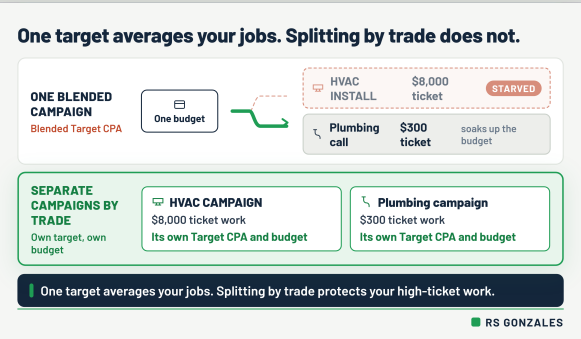
If HVAC is the only trade in your account, you can skip this section. If you also run plumbing or electrical, this is the change most likely to cost you money without an obvious warning.
Here is the trap in one picture. Say your account runs two things: HVAC installs that book at an $8,000 ticket, and plumbing service calls that book at $300. Under the old setup, each could be tuned on its own. After the move, Google averages them into one blended Target CPA across the whole campaign.
- A blended target chases the cheap leads. The system reads the low-ticket plumbing leads as easier to win at your average price, so it leans there and starves the high-ticket HVAC work that pays your year.
- The fix is structural, not a slider. Separate campaigns by trade, so each one carries its own target and its own budget, and your installs stop subsidizing your service calls.
- This is a before-the-switch decision. Waiting until the numbers look off means you have already paid for a month of averaged-out bidding to learn it.
Splitting an account cleanly by trade is the kind of setup work that pays for itself in a single install. It is also the first thing we check when a multi-trade shop hands us an account.
See How We Structure HVAC Ad Accounts
8 Things HVAC Contractors Should Do Before and After The Switch
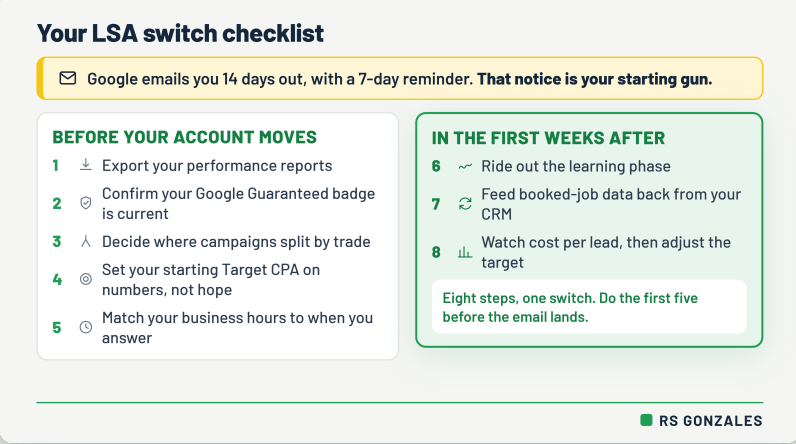
You do not need to rebuild your entire Local Service Ads strategy because of this move. But the few actions that matter really matter.
Google emails you 14 days before your account moves and sends a 7-day reminder, so treat that notice as your starting gun. The first five steps should happen before your account migrates. The last three matter most in the weeks after the switch.
Phase I: Before the Switch
1. Export your performance reports
Your call and message records should follow you into the new Lead Manager, but your old aggregate performance reports will not carry over the same way. That means your historical view of lead volume, cost, booked jobs, and account trends can disappear if you do not save it first.
Export anything you may need to compare later, including lead volume, charged leads, disputed leads, cost per lead, booked-job notes, service categories, and month-by-month performance.
This matters because you cannot manage the new setup well if you lose the old baseline. Without historical data, you are guessing whether the new Target CPA is too high, too low, or right where it should be.
2. Confirm your Google Guaranteed badge is current
The Google Guaranteed badge is one of the biggest trust signals in Local Service Ads. It tells homeowners that Google has verified parts of your business, including licensing, insurance, and background check requirements.
Before the account moves, make sure nothing tied to that badge is expired, outdated, or waiting on verification. Check your license, insurance documents, business information, owner details, and any required team/background information.
The dashboard move should not remove your badge, but lapsed verification can still create problems. Do not wait until lead volume drops to find out something needed to be updated.
3. Decide where campaigns need to split by trade
If you only run HVAC, this step is simple. If your company also runs plumbing, electrical, duct cleaning, or another trade, this is one of the most important decisions on the list.
A single blended campaign can push Google toward the cheapest leads instead of the best leads. For example, a low-ticket plumbing call and a high-ticket HVAC replacement should not always be judged by the same Target CPA.
Map out which services need their own campaign, budget, and target. HVAC installs, emergency repairs, plumbing service calls, and electrical jobs may all have different lead values. If they are mixed together, the automated bidding can learn the wrong lesson.
The fix is structural. Separate the campaigns before the data starts getting averaged together.
4. Set your starting Target CPA on numbers, not hope
Target CPA means target cost per acquisition. In plain English, it is the average amount you are telling Google you are willing to pay for a lead.
Do not set this number based on the lowest cost per lead you wish you could get. Set it based on what a booked lead is actually worth to your business.
Look at your past LSA data and ask:
- What did we usually pay per charged lead?
- How many of those leads turned into booked jobs?
- Which services produced the best revenue?
- Which leads were low-value, unqualified, or not worth chasing?
- What can we afford to pay for a real booked HVAC job?
A low Target CPA may sound efficient, but if it chokes lead volume or pushes the system toward cheaper, weaker opportunities, it can cost more than it saves.
5. Match your business hours to when you actually answer
Local Service Ads reward responsiveness. If your ad shows while no one is available to answer, you can miss calls, waste opportunities, and weaken the quality of your lead handling.
Before the switch, check your business hours, service hours, after-hours process, and call-routing setup. If your phones are answered 24/7, make sure the account reflects that. If you only answer during business hours, do not pretend otherwise just to look available.
The goal is simple: make your ads show when your team can actually respond.
For HVAC contractors, speed matters. A homeowner with no cooling or no heat usually calls the company that answers first, not the company with the prettiest dashboard.
Phase II: After the Switch
6. Ride out the learning phase
After the account moves, expect some fluctuation. Lead volume may move up or down. Cost per lead may swing. The system may need time to understand which searches, services, and customers are most likely to turn into valuable leads.
Do not panic on day three.
One of the biggest mistakes contractors make with automated bidding is changing the target too often. If you reset the Target CPA, budget, hours, or structure every few days, the system has less stable data to learn from.
Give the campaign enough time to settle before making major changes. Watch the numbers closely, but do not confuse normal learning-phase movement with failure.
7. Feed booked-job data back into the campaign
Google does not automatically know which leads became real revenue for your business. If the system only sees raw leads, it may optimize for activity instead of booked jobs.
That is why CRM feedback matters.
Your CRM is the software that logs your customers, calls, estimates, jobs, invoices, and follow-ups. When possible, connect your booked-job data back into the campaign so Google can learn which leads became actual customers.
This helps the system understand the difference between:
- a call that never answered
- a spam or weak lead
- a price shopper
- a repair that booked
- an install estimate that turned into revenue
Tracking which leads turn into work is what separates a profitable ad account from a busy one. It also sits at the heart of winning HVAC leads with paid ads.
8. Watch cost per lead, then adjust the target
Once the learning phase passes, review the numbers before making changes.
Do not look at cost per lead by itself. A lower cost per lead is not always better if those leads do not book. A higher cost per lead can still be profitable if it brings in better jobs, higher-ticket replacements, or stronger service opportunities.
Review:
- cost per lead
- lead volume
- booked-job rate
- cost per booked job
- revenue from LSA leads
- service category performance
- missed calls and response time
- disputed or low-quality leads
Then adjust your Target CPA based on what the lead is actually worth in your market.
The goal is not to pay the cheapest possible number. The goal is to pay the right number for leads that turn into profitable HVAC work. Our guide to what HVAC companies should spend on Google Ads shows how to think through that number.
Will This Change How You Win The Call?
Here is the part that should settle your nerves. The dashboard is moving. The things that decide who books the job are the same as they were last week.
- Speed still wins. The contractor who answers first books the job. A homeowner with no heat calls down the list until someone picks up, and the platform behind the ad does not change that.
- Reviews still drive ranking. LSA rewards review velocity, how steadily new reviews come in, not only your total count. A shop adding reviews every week outranks one sitting on an old pile.
- Service area still matters. How close you are to the searcher feeds your ranking, so an honest, tight service area beats an over-expanded one.
To the homeowner tapping to call, nothing looks different: same top-of-page spot, same green badge, same pay-per-lead billing. What decides the call is what it always was, and that is where a well-run account keeps its edge.
See How We Run Local Service Ads for HVAC Contractors
Get Ahead of the LSA Shift Before Lead Costs Drift With RS Gonzales
We manage Local Service Ads for HVAC contractors every day and have already worked through the platform changes that came before this one. Through a move like this, our job does not change much, because we were already doing the parts that protect you.
- We export and keep your history so nothing you paid for disappears with the old dashboard.
- We split campaigns by trade so a blended target never flattens your highest-value work.
- We feed booked-job data back from your CRM so the new bidding learns from booked revenue, not raw lead counts, and we ride out the learning phase without panic.
The homeowner whose furnace quit tonight does not care which dashboard your ads live in. They care who answers. Our job through this change is to keep that answer being you. For how the paid channels fit together, our HVAC advertising overview shows where LSA sits alongside Meta ads, and the rest of your ad spend.
Don’t Wait for the LSA Move to Expose a Weak Setup
The dashboard change is not the problem. A weak setup is.
If your account is not tracking booked jobs, protecting past data, separating trades correctly, or setting Target CPA based on real lead value, the move into Google Ads can expose gaps that were already costing you money.
RS Gonzales manages Local Service Ads for HVAC contractors with no markup on ad spend, clear pricing, and a lead strategy built around booked work, not empty activity.
Before Google moves your account, let us look at what is working, what is exposed, and what needs to change.