

Then you check Google Maps and see the shop across town picked up 80 reviews in a month. Some of that comes from a good system. Some of it comes from a gift card, a “rate us 1 to 5 first” text, or the owner’s cousin, and those are the shortcuts Google is deleting at scale. In 2025 alone, Google blocked or removed more than 292 million reviews that broke its policies.
Most contractors already know that reviews move your spot on the map. Far fewer know where Google draws the line on asking for them. In this blog, we cover what Google lets you do when you ask for reviews, which shortcuts it punishes, and the exact words that bring in reviews without putting your profile at risk.
Why Do Happy HVAC Customers Forget to Leave a Google Review?
Most of your missing reviews are not from unhappy customers. They are from happy customers who got busy, because nobody made it easy for them to follow through.
- The ask was vague. “Leave us a review sometime” gives the customer no link, no reminder, and no reason to do it today.
- The timing was off. The best moment is the hour after the system kicks back on, while they still feel the relief. Three weeks later, a working AC is something nobody thinks about.
- Asking depended on one tech’s mood. When the ask is optional, it happens on slow days and disappears in July, when your crews are running six calls each.
- There was no link. Searching for your company, finding the profile, and hunting for the review button loses people at every step.
None of that calls for a shortcut. It calls for a system, and Google has written down exactly which systems it allows.
What Does Google Allow When an HVAC Company Asks for Reviews?
Google lets you ask every customer for a review, as long as you do not offer anything in return and do not pick who gets asked. Its Maps content policy says businesses can “solicit or encourage the posting of content that does represent a genuine experience, without offering incentives to do so.” In plain terms, you can ask, and you can ask everyone.
- Ask every customer, every time. Asking is allowed. Asking only the customers you think are happy is not, because Google treats that as review gating.
- Send a direct link or a QR code. Google’s own tips for getting more reviews tell businesses to share a review link or a QR code. Your Google Business Profile, the free listing that shows your company on Google Maps, can create both in a minute.
- Remind them once. One follow-up text a few days later is a reminder, not pressure.
- Tell them why it matters to you. Explaining that reviews help a local company get found is honest, and it works better than any clever wording.
- Reply to every review, good or bad. Replies show the next homeowner how you handle problems, and they sit comfortably inside the rules.
That list is short on purpose. Everything Google bans is some version of controlling who reviews you, or what they say when they do.
Get Your Google Business Profile Set Up Right
Seven Review Shortcuts That Get HVAC Google Profiles Flagged
Most review violations in HVAC are not scams. They are habits an owner picked up from another contractor or a software vendor, and nobody checked them against Google’s policy. Google flags the profile either way, so these are the seven common shortcuts, the rule each one breaks, and the safe version to use instead.
1. A Discount or Gift Card in Exchange for a Review
“Twenty dollars off your next tune-up if you leave us a review” sounds harmless. Google calls it fake engagement anyway, because its policy bans offering “payment, discounts, free goods and/or services” in exchange for a review. That covers raffles, maintenance-plan credits, and free filters too.
Instead: ask without offering anything. An honest ask works without a reward, and Lexany’s Heating and AC in Forney, Texas, earns more than 50 reviews a month that way.
2. Asking Only the Customers You Know Are Happy
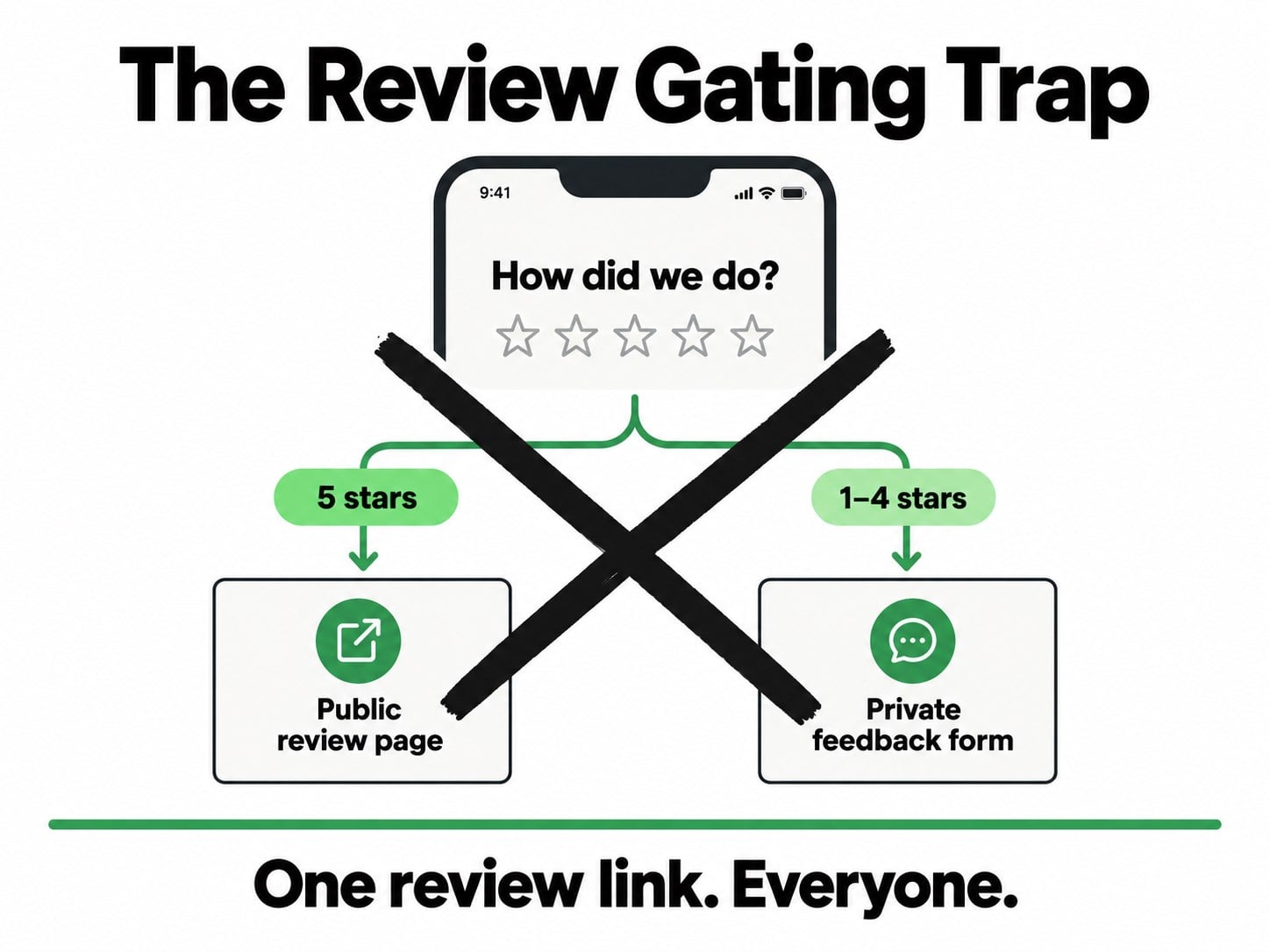
This is called review gating. The usual version is a text asking “How did we do, 1 to 5?” that sends the fives to Google and everyone else to a private feedback form. Google bans it by name, saying businesses may not “selectively solicit positive reviews from customers.” Some review tools still offer it as a setting, so check how yours is configured.
Instead: send the same Google link to every customer. If you want private feedback too, collect it separately, never as a filter in front of the review.
3. Reviews From Your Techs, Your Family, or Your Supply House
Your spouse’s five stars, a tech’s review from a personal account, the distributor rep returning a favor. Google treats every one of these as a conflict of interest, which its policy defines to include “current or former employment” and “other professional or personal affiliations.” The FTC’s rule on fake reviews also bans reviews by company officers and managers that hide the connection.
Instead: keep employees, relatives, and business partners off your profile entirely, even when they paid for a job.
4. Telling Customers What to Write
“Could you mention AC repair in Plano?” is the version marketers love, because a review naming the service and the city helps your ranking. Google’s policy bars businesses from requesting “that specific content be included,” so this one crosses the line even when the customer is happy to do it.
Instead: remind them what you did, not what to say. A text that opens “Thanks for having us out to fix your AC today” jogs their memory, and customers tend to describe the job they remember on their own.
5. Standing Over the Customer While They Write It
Handing over the tech’s tablet, or waiting at the door while the homeowner types, puts pressure on the person you handed an invoice five minutes ago. Google’s policy says businesses should not “require or pressure users to leave ratings or write reviews” on the spot.
Instead: mention it in person, then send the link by text so they can write the review on their own phone, in their own time.
6. A Review Quota or Bonus for Your Techs
Paying techs ten dollars for every review that mentions their name is a popular HVAC incentive, and it breaks two rules at once. Google’s policy calls out businesses “requesting that staff solicit a certain number of reviews,” and it separately bans asking staff to collect reviews “that include specific content.”
Instead: reward techs for asking, not for results. Track whether every completed job got the ask, and let the reviews follow from that.
7. Buying Reviews or Trading Them With Other Contractors
A five-dollar-a-review offer online, or a deal with the plumber down the road to review each other, is paid engagement. Google’s policy covers reviews “paid for, directly or in kind,” and the FTC rule makes buying fake reviews a federal violation as well.
Instead: skip it. There is no safe version of this one, because a handful of bought reviews can put every honest review on your profile at risk too.
What Happens When Google Catches an HVAC Company Breaking Review Rules?
Losing the fake reviews is the mild outcome. Google’s restriction policy for fake engagement lets it go much further, and it emails the owner before it acts.
| What Google can do | What it looks like to a homeowner |
|---|---|
| Block new reviews for a set period | Your review count freezes while competitors keep climbing. |
| Unpublish your existing reviews for a set period | Years of honest five-star reviews disappear from your profile. |
| Show a warning on your profile | A notice tells every visitor that fake reviews were removed. |
Unpublishing hurts the most. A profile with 300 honest reviews and 20 bought ones can have all 320 hidden for a stretch, and the 300 honest ones were the ones bringing in calls.
The warning is the most public penalty. On affected listings, Google Maps has shown the line “Suspected fake reviews were recently removed from this place,” so every homeowner checking you out reads it next to your rating.
The federal side is separate from Google. The FTC’s rule has been in force since October 2024, and it lets the agency seek civil penalties of more than $50,000 per violation. That figure is the limit for a single violation, and a company with several fake reviews can face more than one.
- Is review gating illegal? Google bans it outright and can remove the reviews it produced. The FTC rule targets the harshest version of the same idea, banning threats or intimidation used to stop or remove a negative review.
- Can Google tell a review was paid for? It does not need to prove it to you. Google decides, notifies you, and you can appeal, but your profile carries the restriction in the meantime.
How Should an HVAC Company Ask for Reviews After Every Job?
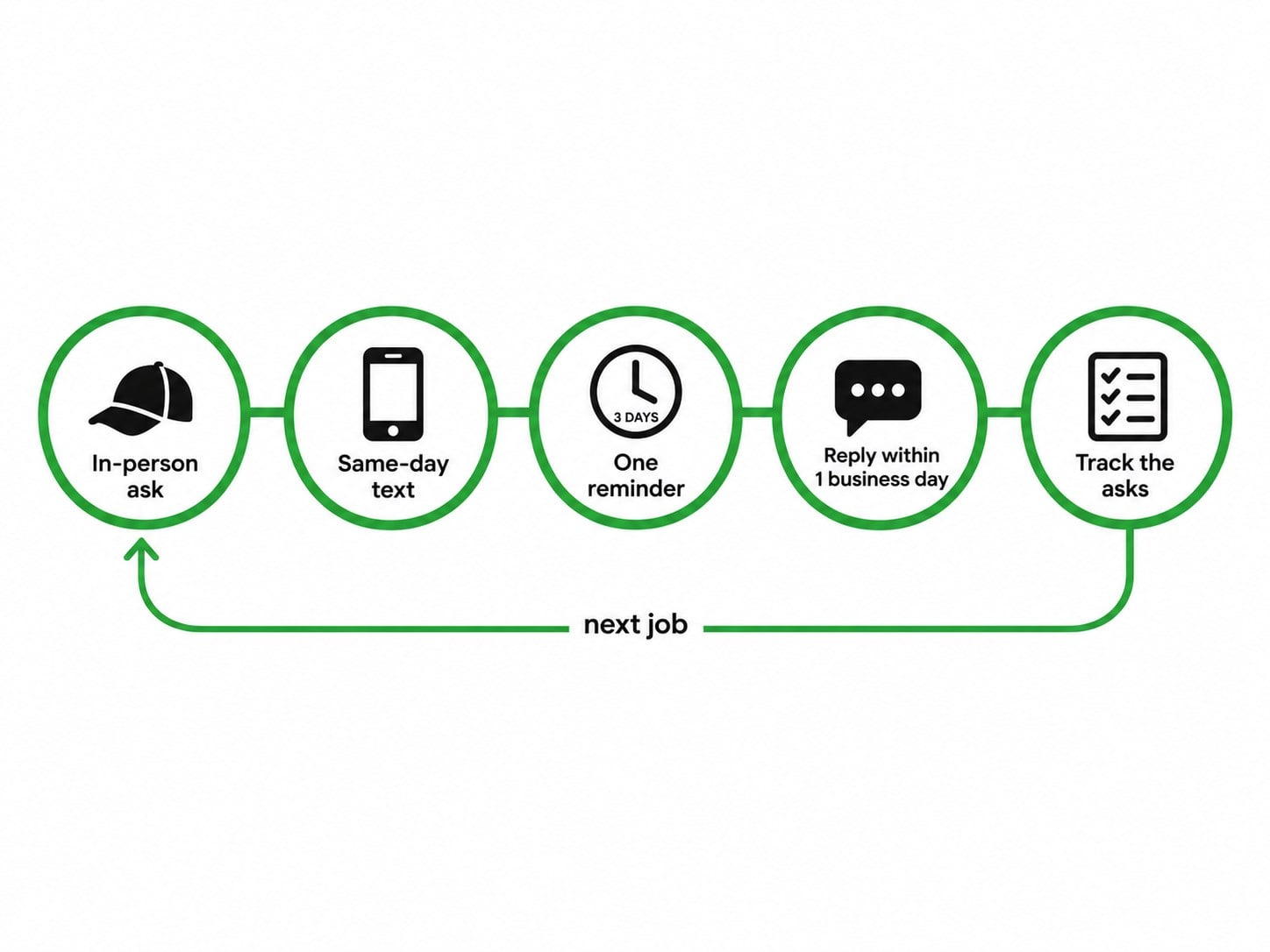
The safe system is also the one that brings in the most reviews, because it runs on every job instead of on somebody’s memory. This is the order we set up for clients.
- The tech mentions it before leaving. One honest sentence at the end of the call, so the text that follows feels expected rather than random.
- A text goes out the same day. It carries a direct link to your Google review form, so leaving a review takes one tap instead of a search. A CRM, the software that keeps track of your customers and jobs, can send it automatically the moment the tech closes the ticket.
- One reminder follows three days later. It goes only to customers who have not left a review yet, and it goes only once.
- Every review gets a reply within one business day. Thank happy customers by name and mention the job. Answer unhappy ones calmly and give them a direct way to reach you.
- You track the asks, not the stars. The number to watch is how many completed jobs got a request. When that stays close to every job, the reviews take care of themselves.
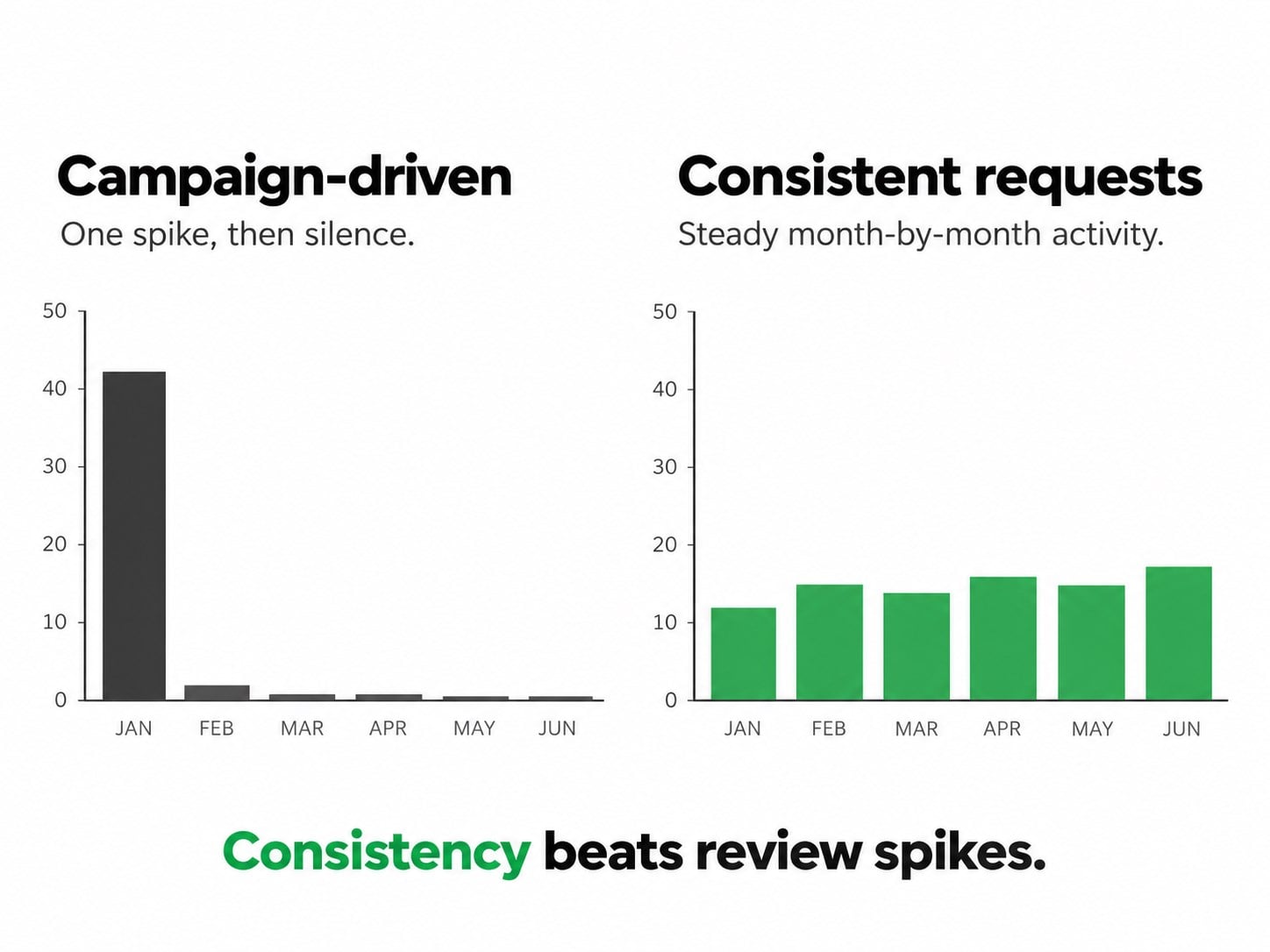
Steady beats a burst. Twenty reviews in one week followed by six quiet months looks like a campaign, and a profile whose newest review is months old loses ground to a competitor whose reviews keep arriving. That is the thinking behind an honest review engine: velocity, not volume.
The payoff now reaches past Google Maps, too. Reviews are one of the sources AI assistants read before naming an HVAC company to a homeowner, so a steady flow of honest ones works for you in two places at once.
See How We Run Google-Compliant Review Management
What Should an HVAC Tech Say When Asking for a Review?
Most techs skip the ask because they do not know how to say it without sounding needy. These three scripts cover the moments that matter most: the end of the call, the text that follows, and one reminder.
The In-Person Ask at the End of the Call
“Before I head out, one small favor. We’re a local company, and Google reviews are how our neighbors find us. I’ll text you the link tonight, and if you have a minute, an honest review would mean a lot.”
It works because it gives the reason, promises the link so the customer has nothing to remember, and says “honest,” which takes the pressure off.
The Text Message That Follows
“Hi Maria, thanks for having us out to fix your AC today. If you have a minute, an honest Google review helps other homeowners find us: [link]. Dave, [Company]”
- Use both first names. A text from Dave reads like a person, while a text from a company reads like a marketing blast.
- Send one link and nothing else. Every extra button is a chance to lose them.
- Leave out offers and star requests. Google bans both.
The One-Time Reminder
“Hi Maria, a quick follow-up in case Tuesday’s link got buried: [link]. Thanks again for choosing us.”
Send it once, three days after the first text, and only if no review has come in. A second reminder turns a favor into a chore, and that is the point where people stop answering your texts at all.
Want Every Script Your Team Needs, Ready to Copy?
The Safe HVAC Review Request Scripts cover the in-person ask for repair, install, and maintenance calls, the texts and emails that follow, replies for good and bad reviews, and a never-say list to share with your techs.
Download the Safe HVAC Review Request Scripts
What Will a Review System Not Fix for Your HVAC Company?
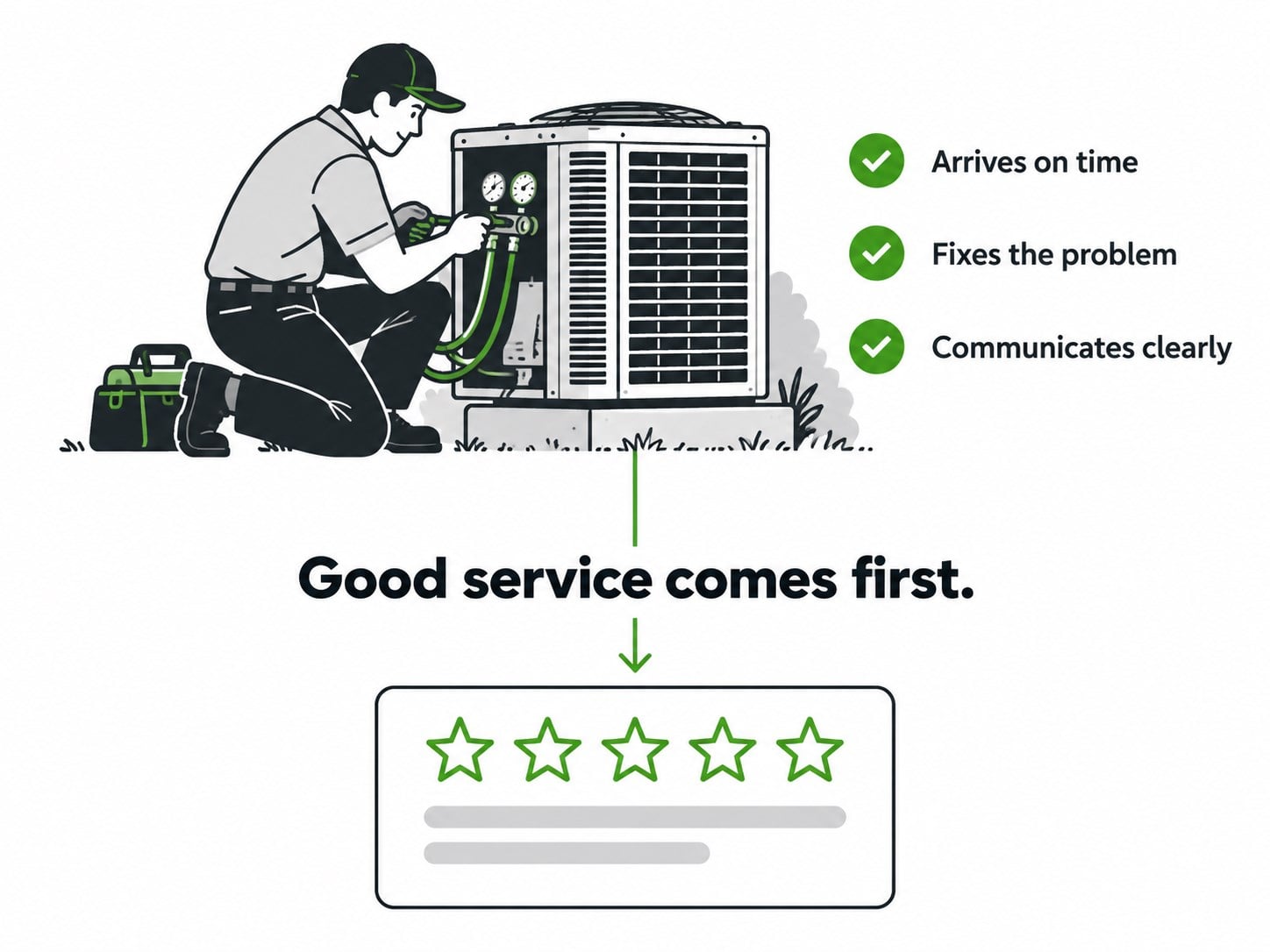
A good review system fixes how often you ask. It does not fix everything around the ask, and we would rather say so now than in month three.
- It will not remove a fair bad review. Google removes reviews that break its policies, not reviews you disagree with. For those, a calm and specific reply is your best tool.
- It will not fix the service. If reviews keep mentioning missed appointments, the problem lives in dispatch, and asking more will only bring more of the same.
- It will not work overnight. A steady system builds month by month, and a burst followed by silence tells homeowners less than a steady trickle of fresh reviews.
- It will not lift a low rating quickly on its own. Climbing from 3.8 to 4.6 stars takes a lot of new five-star reviews, so pair the asking with fixing whatever caused the low ones.
So Where Should You Start Getting More HVAC Reviews This Week?
Your best customers already want to help you. What stops them is a vague ask, a missing link, and a moment that passes, and none of that needs a shortcut Google will punish.
If you do nothing else after reading this, do these three:
- Check your review tool for gating. If any customer gets a star-rating question before the Google link, turn that step off today.
- Get your review link and QR code from your Google Business Profile. Save the link in a text template your techs can send from the driveway.
- Give every tech the same one-sentence ask. Then count asks per completed job for two weeks and watch what happens to your profile.
Getting reviews was never the hard part. Asking every single customer, the same honest way, was.