



Most owners judge their website by the calls it brings in that day. Replacement shoppers rarely call that day. They compare quotes and talk it over at home, and retargeting ads follow up with them on the sites and apps they visit next.
That’s why we add retargeting to the Google and Meta ads we run for HVAC companies once search brings in steady traffic. The shoppers you already paid to reach then see you again.
In this blog, we cover how retargeting works, which HVAC jobs are worth it, and how to set it up without wasting budget. Get those right, and the shoppers who already found you stop drifting to the next company.
What Are HVAC Display Ads and Retargeting Ads?
What Display Ads Are and Where They Run
Display ads are image and video ads that appear on websites, apps, YouTube, and Gmail while people browse, rather than in the search results. Google’s Display Network reaches over 90% of internet users worldwide, so a display ad can follow a homeowner almost anywhere they go online.
How Retargeting Ads Follow Up With Past Visitors
Retargeting, which Google calls remarketing, narrows that reach to the people who already visited your website. A short piece of tracking code on your site adds each visitor to a list. Google uses the Google tag, and Facebook and Instagram use the Meta Pixel. Your ads then show only to the people on that list.
That makes HVAC retargeting a way to follow up with homeowners who already know your name. Brand awareness ads, the kind larger HVAC companies run to get their name known, go to strangers instead. Here is how the three types compare:
| Search ads | Display ads to new audiences | Retargeting ads | |
|---|---|---|---|
| Who sees them | People typing a search like “AC replacement near me” | People who match an area, interest, or topic | People who already visited your website |
| What they are doing | Looking for a contractor right now | Reading, watching videos, or scrolling | Still deciding after they left your site |
| Best HVAC use | Repair calls, emergencies, and ready-to-buy installs | Getting a bigger company’s name known in a market | Replacements, upgrades, and other jobs people take weeks to decide |
| What to judge it on | Calls and booked jobs | Reach, over a long sales cycle | Booked jobs from returning visitors |
Why HVAC Shoppers Leave Your Website Without Calling
A homeowner who leaves your site without calling has usually not chosen someone else yet. For a repair, they call someone within minutes. For a new system, the decision often takes days or weeks, for reasons that have little to do with your website:
- They are comparing quotes. A new system costs thousands of dollars, so many homeowners want more than one estimate before they sign.
- Two people make the decision. One spouse finds your site on a lunch break, and the other wants to see it that evening.
- They are waiting on money. A tax refund, a financing approval, or a utility rebate often decides when they buy.
- The old system still runs. An AC that limps along lets a homeowner put off the call until the day it stops.
Your website decides how many of them call the first time. Pages that load fast, show financing, and put the phone number where a thumb can tap it keep more visitors calling on the first visit.
Retargeting is for the visitors who still need time. Each of them may have cost you an ad click. With HVAC ads as expensive as they are, letting them drift away wastes money you already spent.
Which HVAC Jobs Are Worth Retargeting?
Retargeting earns its budget on jobs a homeowner takes time to decide, and those are usually your biggest tickets. Many of your HVAC replacement leads come from shoppers like this, which is why the replacement pages deserve the follow-up and the repair pages don’t:
| HVAC job | How long homeowners usually take | Worth retargeting? | Why |
|---|---|---|---|
| AC, furnace, or heat pump replacement | Days to weeks | Yes | The biggest ticket and the longest decision |
| Heat pump upgrade from a furnace or AC | Weeks | Yes | Shoppers weigh running costs and rebates, more so since the federal heat pump tax credit ended |
| Indoor air quality, such as air purifiers and humidifiers | Days to weeks | Yes | An add-on many homeowners research before they buy |
| Duct cleaning | Days | Sometimes | Worth it in markets where you sell a lot of it |
| Maintenance plans | It varies | Through email and text first | Past customers are cheaper to reach on your own list |
| Emergency repair | Minutes | No | The homeowner booked someone before your ad could load |
Repairs still matter here, because many installs start as one. A technician finds a 15-year-old system on a repair call, and that evening the homeowner starts reading about replacements. The install versus repair trap is chasing install searches while missing the installs that begin as repair calls. A repair customer who comes back to read your replacement page belongs in your replacement audience.
How much of your ad money belongs to replacement work depends on your job mix. Splitting your HVAC ad budget by job type starts with that mix.
Where HVAC Retargeting Ads Run
You can reach those visitors through Google, through Facebook and Instagram, or through your own email and text list. Google and Meta charge for every ad, and your own list costs nothing per message.
1. Google Display Ads for HVAC, YouTube, and Google Maps
Google retargeting shows your ads on the Display Network, YouTube, and Gmail. Google pay-per-click ads for HVAC put most of the budget into search, because a display ad reaches someone who is not searching. Retargeting is the exception, since the person seeing the ad already visited your site.
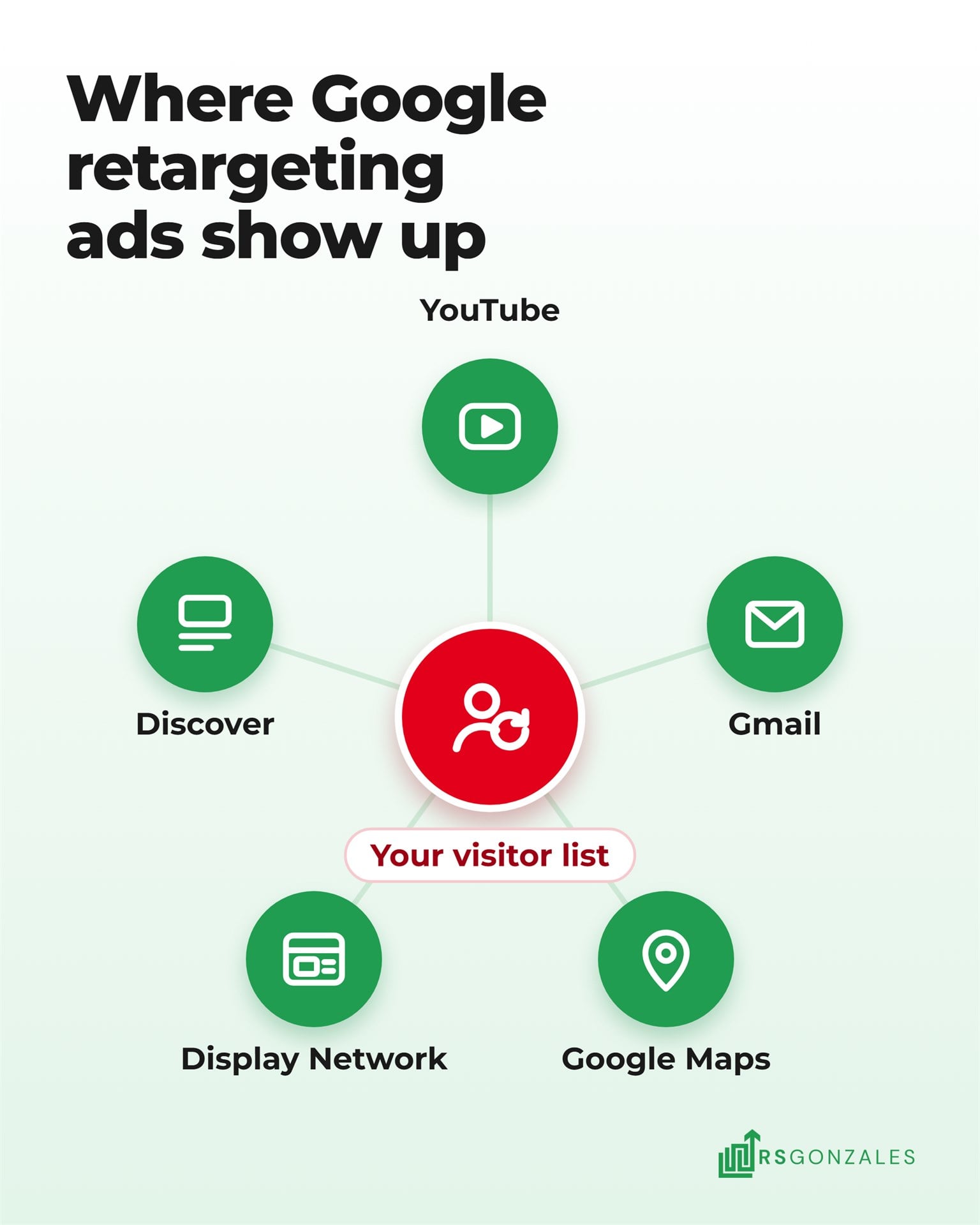
Google is also moving display ads into Demand Gen, a campaign type that reaches people in five places. Google expects the move to finish by 2027, so new display campaigns will end up there:
- YouTube: your ad plays before or during videos, in Shorts, and in the feeds of suggested videos.
- Gmail: your ad sits in the Promotions and Social tabs as people scroll their inbox.
- Discover: your ad appears in the Discover feed, which shows people articles that match their interests.
- The Display Network: your image ad runs on websites and apps outside Google.
- Google Maps: your business shows as a promoted pin when people browse the map, ask for directions, or open a place’s details.
Maps ads only run when your Google Ads account has a location asset, which for most HVAC companies means a linked Google Business Profile. Google has not published how retargeting lists perform on Maps, so treat it as a test once your display retargeting books jobs.
2. Facebook Retargeting for HVAC With the Meta Pixel
Meta, the company behind Facebook and Instagram, builds its retargeting list from the Meta Pixel on your site. Meta calls this list a website custom audience, and it can keep a visitor on it for up to 180 days. In the Meta ads we run for HVAC companies, retargeting brings in the lowest cost per lead of any Meta campaign, because these homeowners already know your name.
One setting decides whether your ads stay on that list. Meta’s Advantage+ audience treats your visitor list as a suggestion and can show your ads to other people when it expects better results. To keep the ads on past visitors only, Meta says to select “Switch to original audience options” in the ad set.
3. Email and Text, the Retargeting You Already Own
Your past customers and open estimates are already on a list, and reaching them costs nothing per view. A homeowner who got a replacement quote and went quiet should hear from you by email and text before any paid ad reaches them. HVAC email marketing sorts that list into groups, like past estimates and customers whose equipment is eight years or older. Each group then gets its own messages.
This is also where your sales process shows. A comfort advisor is the salesperson who gives the in-home estimate. One who calls back two days later, and again the next week, can save jobs that a retargeting ad would otherwise have to chase.
6 Ways to Set Up HVAC Remarketing Without Wasting Budget
Retargeting money gets wasted in predictable ways. Ads reach customers who already booked, visitors who were never going to buy, or the same homeowner so often they tune it out. These six steps keep the money on shoppers who are still deciding.
1. Put the Google Tag and Meta Pixel on Every Page of Your Site
Both codes go on every page, so each visitor is counted wherever they land. Three jobs get them there:
- Set up Google Tag Manager. This free Google tool holds all your tracking codes in one place, and it is how our own website loads the Meta Pixel.
- Add the Google tag and the Meta Pixel inside it, set to fire on every page. The Google tag builds your Google lists, and the Meta Pixel builds your Facebook and Instagram lists.
- Update your privacy policy before the first ad runs. Google requires it to explain that you use visitor data for ads and that companies like Google show those ads on other sites.
2. Build One Audience for Replacement Shoppers, Not One for Every Page
One audience built from all your replacement pages fills faster than a separate list for each page:
- Google’s minimum: a list needs at least 100 active visitors in the last 30 days before it can show ads on the Display Network, YouTube, or in search.
- Why one page falls short: a small shop’s furnace replacement page may not get 100 visitors a month on its own.
- What goes in: your replacement, heat pump, and financing pages, grouped into one replacement shoppers audience.
- What stays out: your repair pages, because a homeowner with a broken system books someone before your ad can reach them.
- Meta’s minimum: Meta only shows ads to a website audience once it reaches a certain size, so the same grouping helps there.
3. Exclude Customers Who Have Already Booked
A homeowner who signed for a new system last week should not see your replacement ad for the next month. Set up the exclusion in this order:
- Export your booked customers from your CRM.
- Upload them as a customer list in Google Ads and in Meta.
- Create the Google campaign paused. In Google Ads, audience exclusions can only be added after a campaign is created.
- Add the customer list as an exclusion, then turn the campaign on.
- In Meta, add the list under “Exclude these custom audiences” in the ad set. Meta keeps custom audience exclusions as a strict limit that Advantage+ audience won’t expand past.
4. Keep the Window Short and Cap How Often Each Person Sees Your Ads
A short window and a frequency cap keep your ads on homeowners who are still deciding. The window is how long a visitor stays on your list, and a frequency cap limits how many times one person sees your ad in a day, week, or month:
| Setting | Meta | What we use | |
|---|---|---|---|
| How long a visitor stays on your list | Up to 540 days | Up to 180 days | 7 to 30 days |
| Frequency cap | Display campaigns can set one, and Demand Gen sets frequency automatically | Only on ad sets with a reach or ThruPlay (video view) goal | Where no cap is available, a short window and a tight audience do the job |
We keep the window to 7 to 30 days because a homeowner who read your AC page in March has fixed the problem or forgotten you by October. Lead campaigns can’t use Meta’s reach or ThruPlay goals, so a Meta lead campaign runs without a cap.
5. Match the Ad to the Page the Homeowner Left
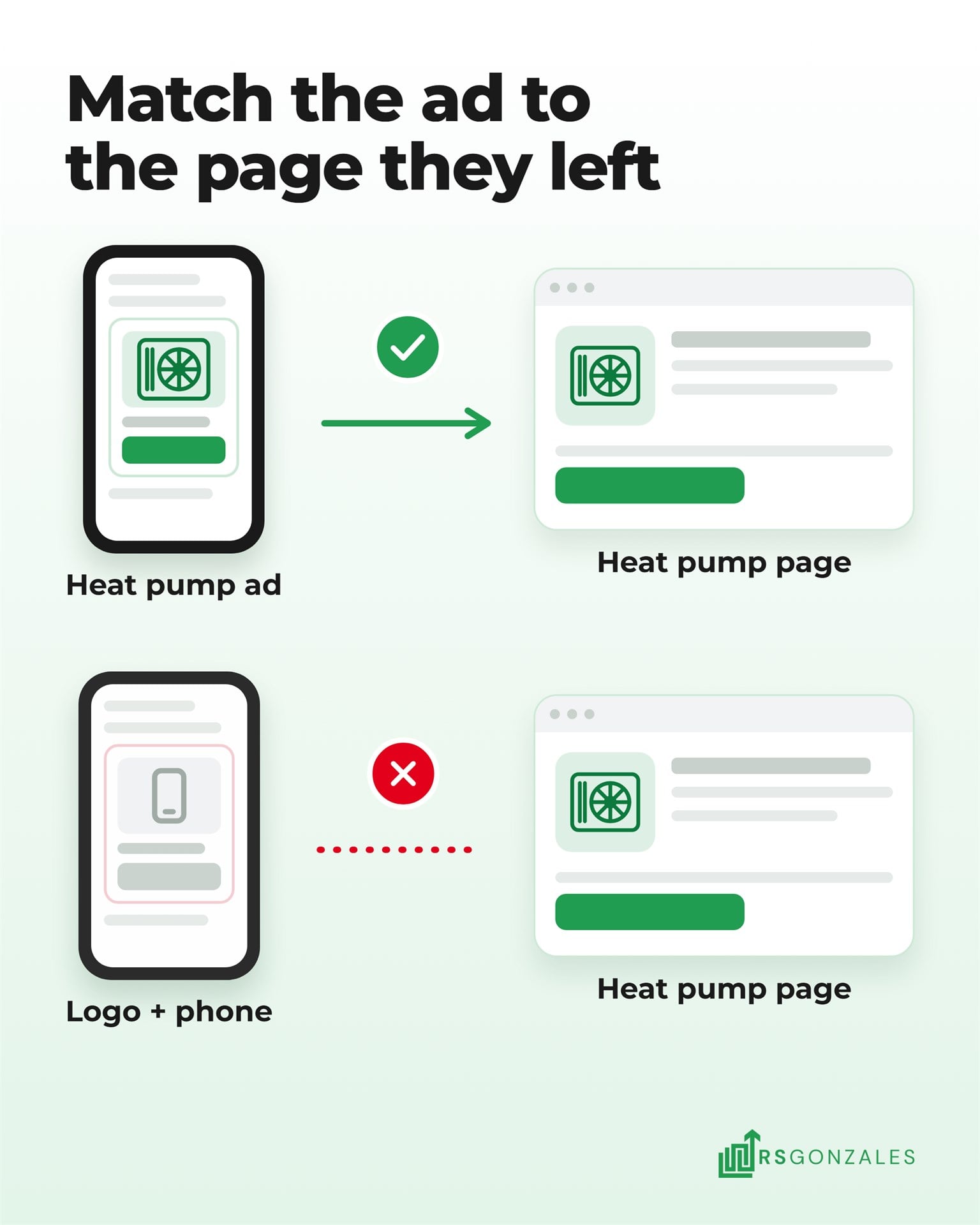
A visitor who read your heat pump page should see a heat pump ad, not your logo and a phone number. Google builds display ads from parts you supply, in a format called a responsive display ad:
- Headlines: up to five, each 30 characters or fewer.
- Long headline: one, up to 90 characters.
- Descriptions: up to five, each 90 characters or fewer.
- Business name: up to 25 characters.
- Images: at least one landscape and one square image.
- Logo: optional, and worth adding so returning visitors recognize you.
Google adjusts the size and format of your ad to fit each site and picks which parts to show together. Here is how ads can line up with the pages people left:
| Who visited | What they read | Ad headline (30 characters max) | Where the ad sends them |
|---|---|---|---|
| Replacement shoppers | AC or furnace replacement pages | Compare AC Options This Week | The replacement page, with a booking form |
| Heat pump shoppers | Heat pump pages | Book a Heat Pump Estimate | The heat pump page, with rebate details |
| Financing readers | The financing page | Monthly Payments on a New AC | The financing page, with the application link |
| Air quality shoppers | Indoor air quality pages | Fix Dry Air in Every Room | The indoor air quality page |
Use only offers your company can back up today. Before a financing ad runs on Facebook or Instagram, check one more rule. Meta counts credit as part of its financial products and services category, so a financing offer may put your ad there. Advertisers in or targeting the US have to declare that category, and declared ads can’t use lookalike audiences or ZIP code targeting.
6. Track Booked Jobs From Retargeting, Not Clicks
Judge retargeting by the replacement jobs it books, because clickthrough rates are often lower on the Display Network than in search. A homeowner may see the ad, then search your company’s name days later and call. Three steps connect the ad to the job:
- Put a call tracking number on the pages your ads send people to.
- Connect every call and form to your CRM. An HVAC CRM that follows each lead to a booked job shows which calls came from retargeting.
- Divide what you spent by the replacement jobs it booked. That cost per booked job, not the cost of a click, shows whether retargeting pays for itself.
HVAC cost per lead benchmarks for 2026 show how your other channels compare.
What HVAC Display Advertising Won’t Do for You
Retargeting works best when the rest of your marketing already brings people to your site and turns some of them into calls. It can’t book emergency calls, rescue a website that loses visitors, run without traffic, or prove itself in a week.
Display Ads Won’t Book Emergency Repair Calls
A homeowner with no heat calls the first company that answers. A display ad reaches people who are not searching. Emergency budgets belong in search ads and Local Service Ads, which sit at the top of Google when someone needs help now.
Retargeting Won’t Fix a Website That Loses Visitors
If your site loads slowly or hides the phone number, retargeting pays to bring people back to the same problem. Decide first whether to optimize or rebuild your HVAC website. An HVAC website built to book calls then gives every returning visitor something to act on.
Retargeting Won’t Work Without Enough Website Visitors
A list needs visitors to fill it. A site with a few hundred visits a month may never reach Google’s minimum for its replacement pages. Grow the traffic first with search ads, Local Service Ads, and SEO, then switch retargeting on when the lists fill.
Display Ads Won’t Show Results in the First Week
A replacement shopper may see your ad for weeks before calling, so clicks in week one tell you little. Judge retargeting over 60 to 90 days, the same window you would give any channel that sells replacements.
Should You Run HVAC Retargeting Yourself or Hire Help?
Retargeting is quick to switch on and easy to leave running wrong. A missing exclusion or a 180-day window keeps spending every day, and nothing in the account warns you.
What Are the Pros and Cons of Running HVAC Retargeting Yourself?
Running it in-house works when someone on your team already manages your Google or Meta ads and has time to check them each week. Here is how the trade-off looks:
| What you weigh | The upside of doing it yourself | The catch |
|---|---|---|
| Cost | No management fee, so every dollar goes to Google or Meta | A missing exclusion spends those dollars on customers you already have |
| Time | The tag, pixel, and first audiences take an afternoon | Ads, audiences, and exclusions need a check every week, including in peak season |
| Learning | You learn how Google and Meta audiences work | Display is moving into Demand Gen, and Meta keeps changing its audience settings |
| Control | You choose every audience, window, and ad | Advantage+ audience can widen your list if you miss one setting |
| Reporting | Google and Meta each show their own clicks and views | Neither shows which replacement jobs retargeting booked, unless your calls and CRM are tracked |
Hand it off when nobody on your team owns it or your tracking is new. It also makes sense when you want retargeting measured next to every other channel in one report.
Why HVAC Companies Run Retargeting With RS Gonzales
A retargeting audience is a few settings in Google Ads and Meta. What decides your results is how retargeting fits with the rest of your ads and follow-up:
- Your money moves to the channel booking jobs for less. Retargeting sits in the same plan as your other ads, so budget shifts to whichever channel books jobs at the lowest cost.
- We build the whole follow-up, not only the ad. Our team writes the offer and makes the creative, then sets up the lead forms, CRM, and texts and emails that bring a shopper back.
- Every audience and benchmark comes from HVAC. We’re HVAC-first, and each account manager is capped at 12 clients.
We recommend at least $3,000 a month in ad spend across your channels. It is a recommendation, not a minimum, and you approve every budget before it runs.
See How We Run Meta Ads and Retargeting for HVAC
What HVAC Owners Should Take Away About Display Ads and Retargeting
HVAC display advertising can win back website visitors who didn’t call, because most of them are replacement shoppers still deciding. The ads that work follow up with those homeowners and match the page they left. Display advertising does that well when it runs on a short list, leaves out customers who already booked, and is judged on booked jobs. Aimed at strangers or emergency calls, it spends money without booking much.
It works best as one part of your HVAC lead generation, with search ads bringing visitors in, and email, text, and retargeting bringing them back. Start with these three steps:
- Check that your tracking codes load on every page. Without them, no retargeting list can build. Open your site with Google’s Tag Assistant and Meta’s Pixel Helper browser extensions, and both show which codes fire on each page.
- Count last month’s visitors to your replacement pages. The number shows whether a replacement audience would reach Google’s 100-visitor minimum. In Google Analytics, open the Pages and screens report and add up the active users on your replacement, heat pump, and financing pages.
- Email your open estimates this week. It is the cheapest retargeting you have, and these homeowners already invited you into their homes. Pull every estimate from the last 60 days that didn’t book, and send each one a short note with your financing option and a direct phone number.
The visitors who leave your site without calling are not lost leads. Many are replacement jobs still being decided, and the company they keep seeing is the one they remember when they are ready.