

The ad won’t get ChatGPT to recommend you. It sits under the answer, labeled as sponsored, and OpenAI’s ad principles rule out ads changing what the answer says. Getting named inside the answer is a separate job, and AI search optimization for HVAC companies earns that mention over months.
An ad, by contrast, can run within about a week. OpenAI’s minimum budget is $25 a day, and we recommend $50 so a one-month test brings in enough calls to judge.
In this blog, we cover what to have ready, the seven setup steps, and how your first 30 days may look like running ChatGPT ads. Follow them in order, and every call your first ad brings in gets counted from day one.
What Should an HVAC Company Have Ready Before Setting Up ChatGPT Ads?
Each ChatGPT ad is only a 50-character title and a 100-character body, so writing it is the easy part. Setups stall on small things instead, like a missing logo file or a card in a different name from your website. Treat it like loading the truck before a no-heat call: the job goes fast when every part is already on board.
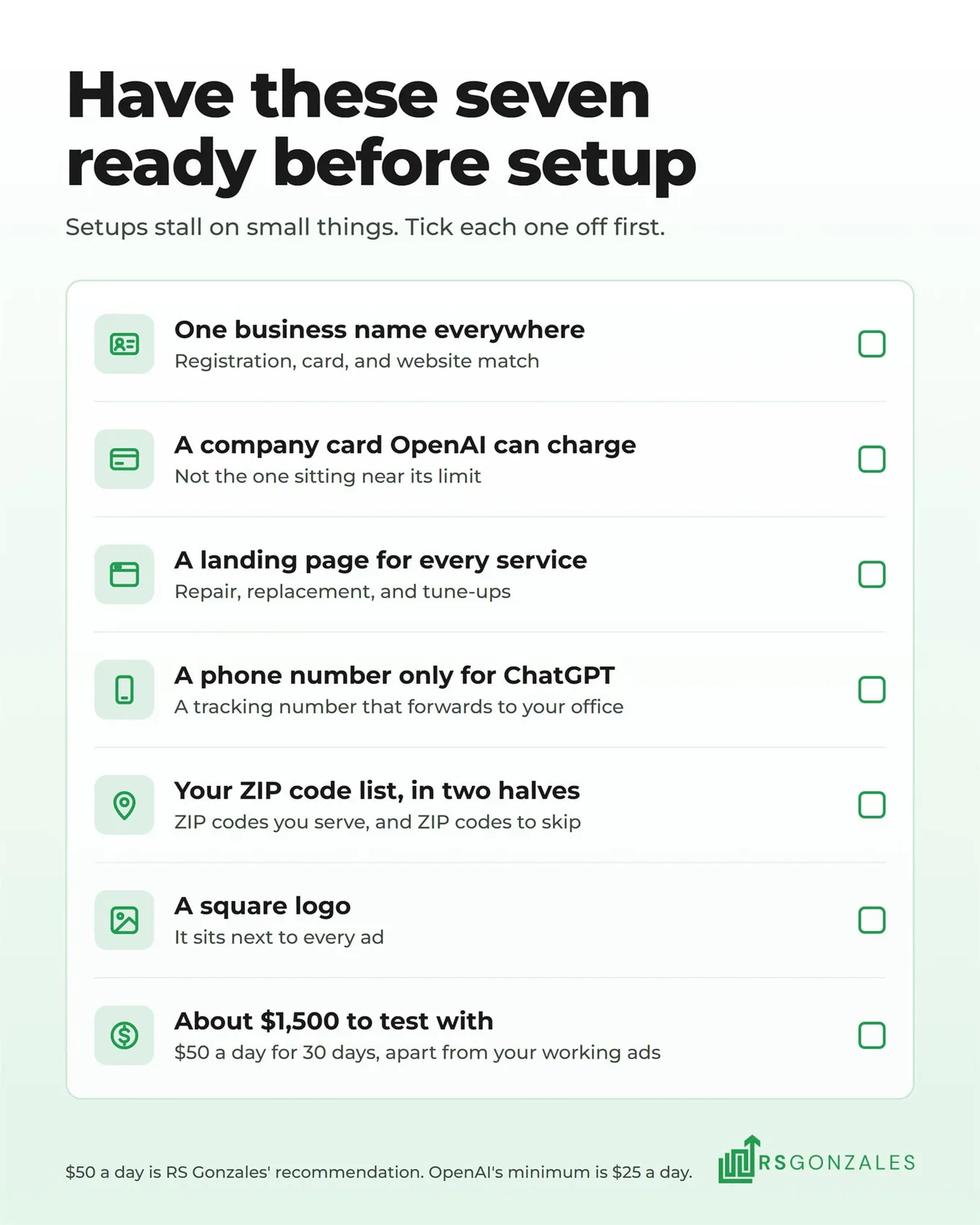
- One business name, spelled the same everywhere. OpenAI checks your business during verification. If your registration says “Smith Mechanical LLC” and your website footer says “Smith Heating & Air,” expect questions. Pick your legal name and match it on your registration, your card, and your site.
- A company card OpenAI can charge. OpenAI bills your saved card each time your unpaid spend reaches a set amount. Its billing guide says it may also place a temporary $100 hold, so skip the card that sits near its limit.
- A landing page for every service. A landing page is the page someone reaches after clicking your ad. A homeowner with a dead furnace should land on a furnace repair page, not your homepage. Build one each for repair, replacement, and tune-ups. HVAC websites built to book calls put a phone number and a short form at the top of every one.
- A phone number only for ChatGPT. A call tracking number forwards to your office and records which ad sent the call. Give ChatGPT its own number, or its calls get lost in the pile with your Google calls.
- Your ZIP code list, in two halves. First, write down every ZIP code you serve. Then list the nearby ZIP codes you would rather skip, like the areas that would put your technicians an hour in traffic.
- A square logo. Your logo sits next to every ad. Find a clean square version now, so you are not cropping one out of a truck wrap photo at the last minute.
- About $1,500 to test with. That covers $50 a day for 30 days. Keep it apart from the money already booking your jobs, so a new test never starves a channel that works.
Seven Steps to Set Up ChatGPT Ads Manager for an HVAC Company
With those in hand, most of the setup moves quickly, and the longest wait is verification. You build the ads in OpenAI’s Ads Manager, the online dashboard at ads.openai.com where you create, pay for, and track your ChatGPT ads. It works much like the Google Ads account you may already use, and every account in it has three layers. A campaign holds your goal and budget. An ad group holds your context hints and your bid. The ad is what the homeowner sees.
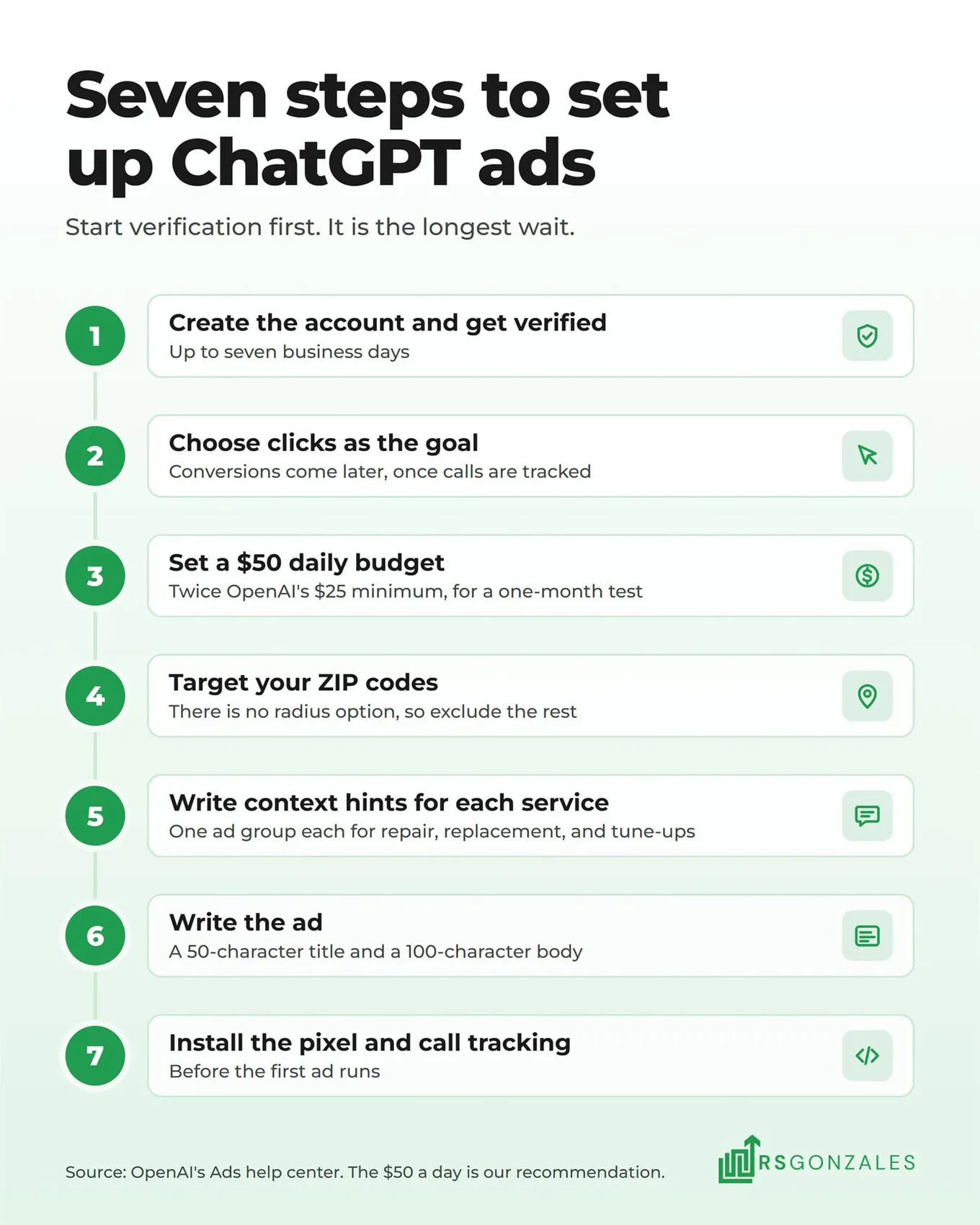
1. Create an Ads Manager Account and Get Your HVAC Business Verified
Sign in at ads.openai.com with an OpenAI login and enter your business details. The name you enter becomes the brand name shown in your ads and the legal name used for billing and verification. You can edit either one later, but each change sends the account back for review.
Three settings are permanent: country, currency, and time zone. Pick them carefully, because you cannot change them after the account is created.
Then OpenAI verifies your business. Its onboarding guide says this can take up to seven business days, so start verification first and build the rest while you wait.
2. Choose the Campaign Goal: Clicks First, Conversions Once Calls Are Tracked
Your first campaign starts with a name and a goal. Give it a name you will recognize a month from now, such as “Heating Repair Test, Clicks.” Then pick the goal, which tells ChatGPT what to chase with your budget. OpenAI’s campaign guide lists three:
- Views. You pay for every 1,000 times your ad is shown, whether anyone clicks or not. It gets your name seen, but it is a weak way to make the phone ring.
- Clicks. You pay each time someone clicks through to your landing page. ChatGPT shows the ad to the people most likely to click, which is the closest thing to a call a new account can measure.
- Conversions. You still pay per click or per 1,000 views, but ChatGPT aims the ad at people more likely to fill in your form or book online. It needs the OpenAI pixel, a short piece of code on your landing pages that reports those form fills and bookings back to OpenAI.
Start a new HVAC account on clicks. A conversions campaign learns from the leads your tracking has already recorded, and a brand-new account has none. The move to conversions happens in five steps:
- Launch on clicks, with tracking already in place. Install the OpenAI pixel and your call tracking number before the first ad runs, so every lead is recorded from day one.
- Let the leads build up. Each form fill and online booking the pixel records shows ChatGPT another example of a visitor who became a customer.
- Build a second campaign set to conversions. The goal is locked once a campaign is created, so the first one cannot be switched. Create a new campaign, choose conversions, and pick the one action it should chase, such as a new lead or a scheduled appointment.
- Set a bid cap on each ad group. OpenAI’s guide to conversion campaigns asks for a bid cap on every ad group, meaning the highest bid you will let ChatGPT place.
- Run both side by side, then compare. Keep the clicks campaign running until the conversions campaign books leads for less, then move the budget across.
3. Set a $50 Daily Budget for a One-Month Test
Choose a daily budget rather than a lifetime one. A daily budget lets you raise or cut spend as the test goes. OpenAI lets you switch a lifetime budget to daily, but not back.
OpenAI’s minimum is $25 a day for U.S. accounts, and we recommend $50. The difference comes down to data. A new campaign learns who clicks and who calls from the traffic it gets, so at $25 a day it collects that traffic half as fast. A month at the minimum can end with too few calls to tell whether ChatGPT works for your company.
At $50, the same month gives you roughly twice the clicks to judge. It also gives a conversions campaign twice as many leads to learn from once you add one. If $50 a day would mean pulling money from Google Ads or Local Services Ads that already book jobs, wait until it doesn’t.
ChatGPT can spend up to twice your daily budget on a busy day, but OpenAI’s daily budget rules cap any seven days at seven days’ worth. A $50 budget keeps every week at or under $350.
For bidding, pick Maximize clicks to start, which lets ChatGPT set each bid to get the most clicks for your budget. A fixed bid gives you more control, but it is easy to set too low. The daily budget also has to be at least as high as your highest fixed bid.
4. Target the ZIP Codes Your HVAC Company Serves, and Exclude the Rest
In the U.S., ChatGPT ads can target a state, a metro area, or individual ZIP codes. The metro option uses the TV market around a city, which ad platforms call a DMA. There is no radius option, so you cannot draw a 25-mile circle around your shop.
Enter your ZIP code list instead. A company serving 14 ZIP codes across three suburbs then pays for homeowners in those 14 ZIP codes, not the whole metro. Add exclusions for any areas inside your target you want to skip, such as the ZIP codes across a bridge your trucks never cross.
Your ads reach logged-in adults on ChatGPT’s Free and Go plans. Plus, Pro, and business subscribers see no ads, according to OpenAI’s approach to advertising. You can also choose devices: the ChatGPT app on iPhone or Android, or ChatGPT in a web browser. Leave all of them on for a first test, then check your report to see where the clicks came from.
5. Write Context Hints for Repair, Installation, and Maintenance
Context hints take the place of keywords. They are short descriptions of the situations your ad fits, and ChatGPT can show the ad when a conversation matches them. Hints live in the ad group, so build one ad group per service:
- Repair: “Homeowner whose furnace won’t turn on and needs a technician to come out.”
- Replacement: “Homeowner comparing the cost of replacing an old air conditioner or heat pump.”
- Tune-ups: “Homeowner planning a furnace tune-up before winter.”
OpenAI’s context hint guide asks for one clear idea per hint, written as a natural phrase rather than a keyword list. It also asks for hints that add something your ad and landing page do not already say, and for updates whenever your services or service area change.
More hints do not mean more reach. One advertiser in a Reddit discussion of ChatGPT ads reported that about 1,000 words of hints barely delivered. Cutting them to a few hundred words brought spend up to the full $25 a day. Start with three to five hints per service and add more only once you see which ones work.
Hints cannot do a targeting job either. They cannot keep an ad inside your service area or off certain hours, so writing a city into a hint does not limit where the ad shows. Your ZIP code list handles that.
6. Write a ChatGPT Ad That Fits a 50-Character Title and 100-Character Body
Each ad has a title of up to 50 characters, a body of up to 100 characters, an optional price, an image, and the address of its landing page. Your brand name and logo come from the account settings. Images are square PNG or JPG files, up to 1200 by 1200 pixels. There is no button to write, because OpenAI adds the action label itself.
Here is how one ad per service can look, with your city in place of [City]:
| Ad group | Title (50 characters max) | Body (100 characters max) |
|---|---|---|
| Repair | Furnace Not Heating? Book a [City] Technician | Licensed technicians, upfront pricing, and openings this week. Call or book online. |
| Replacement | New AC Quotes in [City], Financing Available | Compare system options and monthly payments in one visit. Book a free in-home estimate. |
| Tune-ups | Fall Furnace Tune-Up in [City] | Catch a worn part before the first freeze. Book your tune-up online or call us. |
Two rules keep those ads approved:
- Every claim has to be true today. OpenAI’s ad policies ban unsupported claims about results, pricing, and affiliations. Use “licensed”, “financing”, or a manufacturer name only if your company can back it up.
- The landing page has to match the ad. It must load, it cannot block OpenAI’s systems, and it has to describe the same service the ad offers. A furnace repair ad that lands on your homepage is the kind of mismatch that gets rejected.
Every ad is reviewed before it runs, and any edit sends it back into review. Save your changes and make them together, so the ad spends less time offline.
7. Install the OpenAI Pixel and a Call Tracking Number Before Launch
The OpenAI pixel is a short piece of code that goes in the header of each landing page. It reports when someone who clicked your ad fills in your form or books online, using OpenAI’s standard events for a new lead and a scheduled appointment, as its pixel guide describes. OpenAI also offers a Conversions API, a direct connection that sends the same events from your own systems instead of the web page.
The pixel cannot see phone calls, and HVAC customers call. That is why the ChatGPT-only tracking number matters. Put it on each landing page so every ring is counted, then connect those calls and forms to an HVAC CRM that follows each lead to a booked job. You then judge the channel on revenue rather than clicks.
Add UTM codes to your landing page addresses as well. These are short labels at the end of a link that tell Google Analytics where a visit came from. Without them, advertisers have reported ChatGPT ad clicks showing up as Direct traffic, with no sign of where they started. OpenAI never shares the conversation with you, only the totals.
These are the settings that matter most for a first HVAC test:
| Setting | What to pick for a first HVAC test | Why |
|---|---|---|
| Campaign goal | Clicks | A conversions campaign needs tracked leads to learn from |
| Budget | $50 a day, set as a daily budget | Twice OpenAI’s $25 minimum, so a month brings in enough calls to judge |
| Bidding | Maximize clicks | Avoids a fixed bid set too low to win |
| Location | Your ZIP code list, plus exclusions | There is no radius option |
| Devices | All of them | The report shows where clicks come from |
| Ad groups | Repair, replacement, and tune-ups | Each service gets its own hints and its own ad |
| Tracking | Pixel, a ChatGPT-only call tracking number, and UTM codes | Calls and forms both get counted |
A Week-by-Week Plan for Your First 30 Days of HVAC ChatGPT Ads
Once the ads are live, give the test a full month before you judge it, because one week of numbers on a new platform is too little to judge. Fund it on top of your current ads. Splitting your HVAC ad budget by channel keeps a new test from taking money away from the channels already booking jobs.
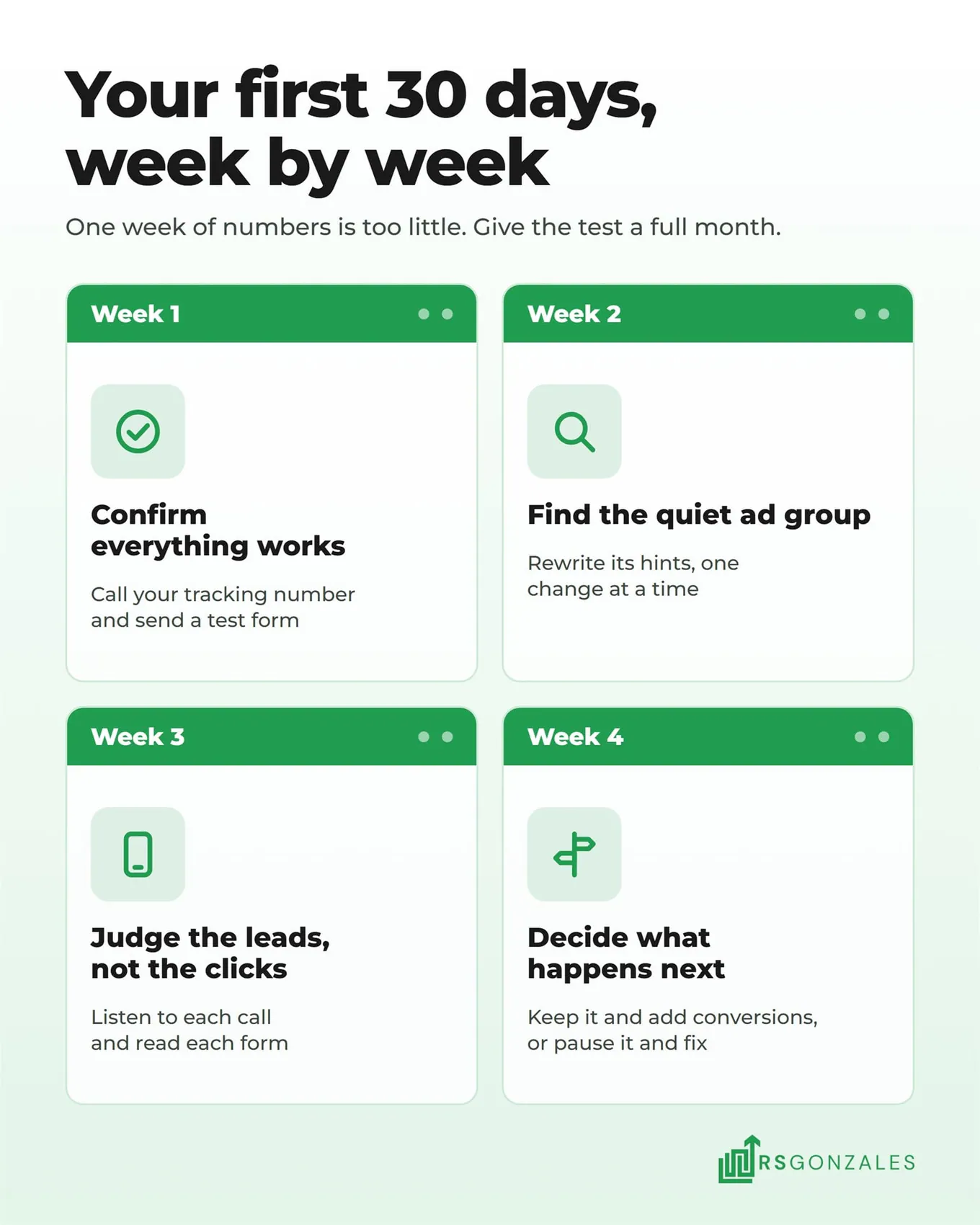
- Week 1, confirm everything works. Check that every ad shows as approved and is spending. Call your ChatGPT tracking number yourself, and send a test form, to confirm both get counted.
- Week 2, find the quiet ad group. Compare impressions, the number of times each ad was shown, across repair, replacement, and tune-ups. Rewrite the hints in any ad group that barely shows, changing one thing at a time.
- Week 3, judge the leads, not the clicks. Listen to each call and read each form. Check whether it came from inside your area and whether it was a job you want. Google Local Services Ads charge per lead, which makes them the easiest channel to compare your cost per lead against.
- Week 4, decide what happens next. If the test brought in booked jobs at a cost you can live with, keep it and add a conversions campaign beside the clicks one. If it brought in none, pause it and fix the weakest part before trying again: the hints, the ZIP code list, or the landing page.
Should You Run ChatGPT Ads Yourself or Hand Them to an HVAC Ad Team?
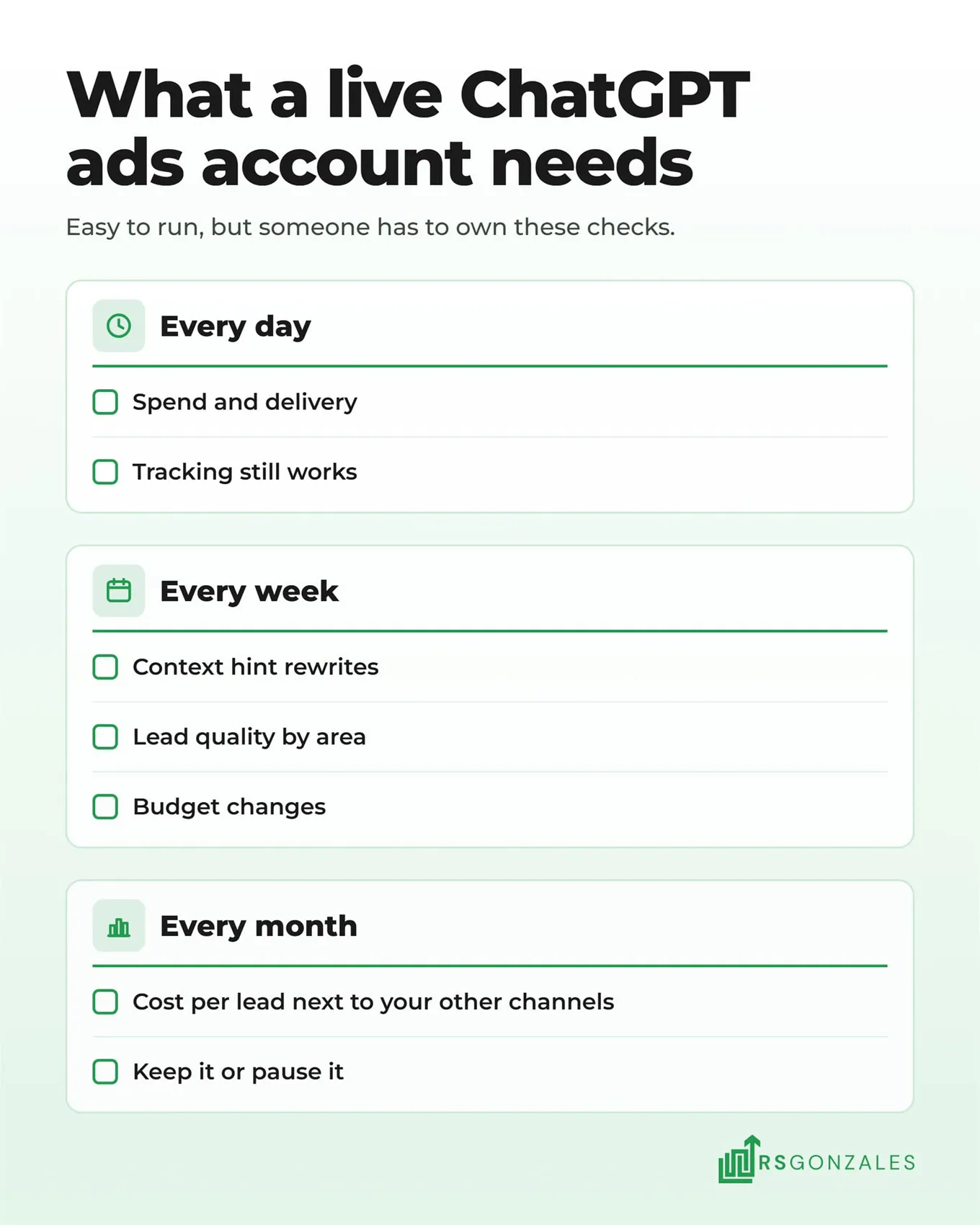
ChatGPT ads are easy to run once they are set up. The bigger question after the first month is who watches the account, because it needs a short check every day and a longer review every week:
- Every day: spend, delivery, and whether the tracking still works.
- Every week: hint rewrites, lead quality by area, and budget changes.
- Every month: cost per lead next to your other channels, and the decision to keep or pause.
What Are the Pros and Cons of Running ChatGPT Ads Yourself?
Running ChatGPT ads in-house works when someone on your team already manages your Google Ads and has time for the daily check. Here is how the trade-off looks:
| What you weigh | The upside of doing it yourself | The catch |
|---|---|---|
| Cost | No management fee, so every dollar goes to OpenAI | A loose hint or a wrong ZIP code list wastes those dollars instead |
| Time | Setup is simple, and OpenAI’s help guides cover every step | Daily checks and weekly hint rewrites still land in your busiest weeks |
| Learning | You learn a new platform before most competitors do | Its rules and features are still changing, so you keep relearning it |
| Control | You decide every hint, ad, and budget change | A broken tracking number goes unnoticed until you spot it yourself |
| Reporting | Ads Manager shows ChatGPT’s spend, clicks, and leads | It cannot show whether ChatGPT books jobs for less than Google Ads, Local Services Ads, Meta, or Yelp |
Hand it off when nobody on your team owns it, when call tracking is new to you, or when you want ChatGPT measured next to every other channel in one report.
Why Hand Your ChatGPT Ads to an HVAC Ad Team Like RS Gonzales?
Launching the ads is the easy part. What decides your results is how ChatGPT fits with the rest of your ad budget, and here is what that looks like with us:
- Your money moves to the channel booking jobs for less. Your ChatGPT ads sit in the same plan as your Google Ads, Local Services Ads, Meta, and Yelp campaigns. When ChatGPT brings in jobs for less than another channel, budget moves toward it, and when it lags, budget moves back.
- We test new ad platforms while they are early. We run ChatGPT ads on our own agency account today, and the setup in this blog is the one we use. You hear what works on a new channel before your competitors try it.
- We know how AI tools decide which contractors to name. Our AI search optimization gets clients named inside ChatGPT’s answers and brings them leads from those tools. That tells us how ChatGPT reads a homeowner’s question, and it shapes every context hint we write.
We add ChatGPT ads to an HVAC company’s ad plan only once its Google Ads and Local Services Ads book jobs at a profit. That usually means $10,000 or more a month in ad spend. Our managed tests run at the same $50 a day, and they never replace a channel that is already working.
See How We Run HVAC Ads Across Every Channel
What Should You Set Up First for ChatGPT Ads This Week?
Homeowners already ask ChatGPT about their systems, and the ads under those answers are new, so your competitors are learning the platform at the same time you are. Verification is the slowest step, which makes it the one to start first.
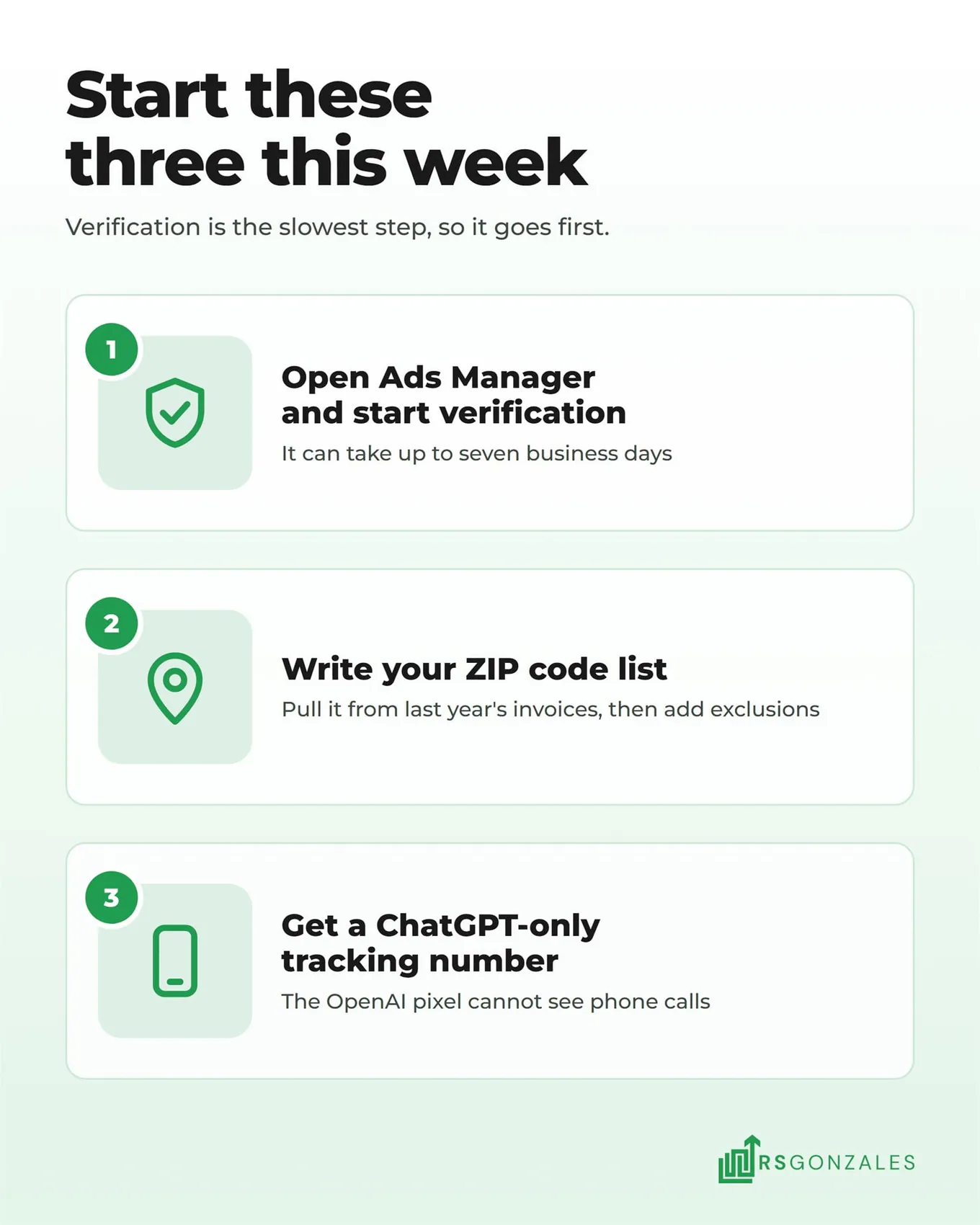
Start with these three:
- Open your Ads Manager account and start verification. Sign in at ads.openai.com and enter your legal business name exactly as it appears on your registration. Verification can take up to seven business days, and no ad can run until it clears, so start the clock today.
- Write your ZIP code list. ChatGPT ads have no radius setting, so this list decides where every dollar goes. Pull the ZIP codes from last year’s invoices to see where your jobs come from, then add the nearby ZIP codes to exclude.
- Get a ChatGPT-only call tracking number. Many HVAC customers would rather call than fill in a form, and the OpenAI pixel cannot see phone calls. A separate number that forwards to your office is the only way to tell which calls this channel brought in.
A week of setup is what separates the HVAC company under ChatGPT’s answer from the companies a homeowner never sees.