


The homeowner is on a phone, on cellular, in a house that is 88 degrees, and they will give you a few seconds before going back to the results page. The other reader is not a person at all. It is a machine pulling your pages without a browser, deciding whether your company is worth naming in an answer.
Most HVAC websites were built for neither. They were built to look like a brochure, and a brochure is what they perform like.
Why Do HVAC Websites That Look Fine Still Lose Jobs?

A site fails in 2026 for reasons that are invisible from the inside. Nothing breaks, nothing looks wrong, and the phone rings less than it should.
- Nobody bounces loudly. A homeowner who leaves after four seconds leaves no message, no form, and nothing in your inbox. The lost job and the quiet week look identical in your analytics.
- Your own visits are the least representative traffic on the site. You arrive with the site cached, you know where everything is, and you never test it on a weak signal in a customer’s driveway.
- The machine never complains. If an AI system cannot read your pages, it does not send an error. It names somebody else and moves on.
Two readers, two different sets of requirements, and one website that has to satisfy both.
What Does a Homeowner on a Phone Need From Your Site?
Speed is not a design preference. Google measures it with three numbers, publishes the thresholds, and uses them as a ranking signal, so they are worth knowing in plain language.
- Largest Contentful Paint (LCP). How long until the biggest thing on screen finishes loading, usually your hero image or headline. Good is under 2.5 seconds. Over 4 seconds is rated poor.
- Interaction to Next Paint (INP). How long the page takes to respond when somebody taps something. Good is under 200 milliseconds, which is about a fifth of a second. Over 500 milliseconds feels broken.
- Cumulative Layout Shift (CLS). How much the page jumps around while loading. Good is under 0.1. This is the one that makes a homeowner tap the wrong button when an ad or image loads late and shoves the call button sideways.
Google scores these on visitor data at the 75th percentile, which means three quarters of your actual visits have to clear the bar, not your best one. Fewer than half of mobile sites currently pass all three.
The three things that break HVAC sites specifically
- Hero images straight off a camera. A 4MB photo of a technician is the single most common reason an HVAC homepage misses LCP. Resized and compressed properly, the same image loads in a fraction of the time and looks identical on a phone.
- A slider or video on the homepage. Both push the biggest element later, and both are usually there because somebody thought the page looked empty. Neither books jobs.
- The phone number as an image or inside a logo. A homeowner cannot tap it, and a machine cannot read it. Every page needs the number as text and as a tappable link.
See How We Build HVAC Websites That Load Fast
Can a Machine Read Your HVAC Website at All?
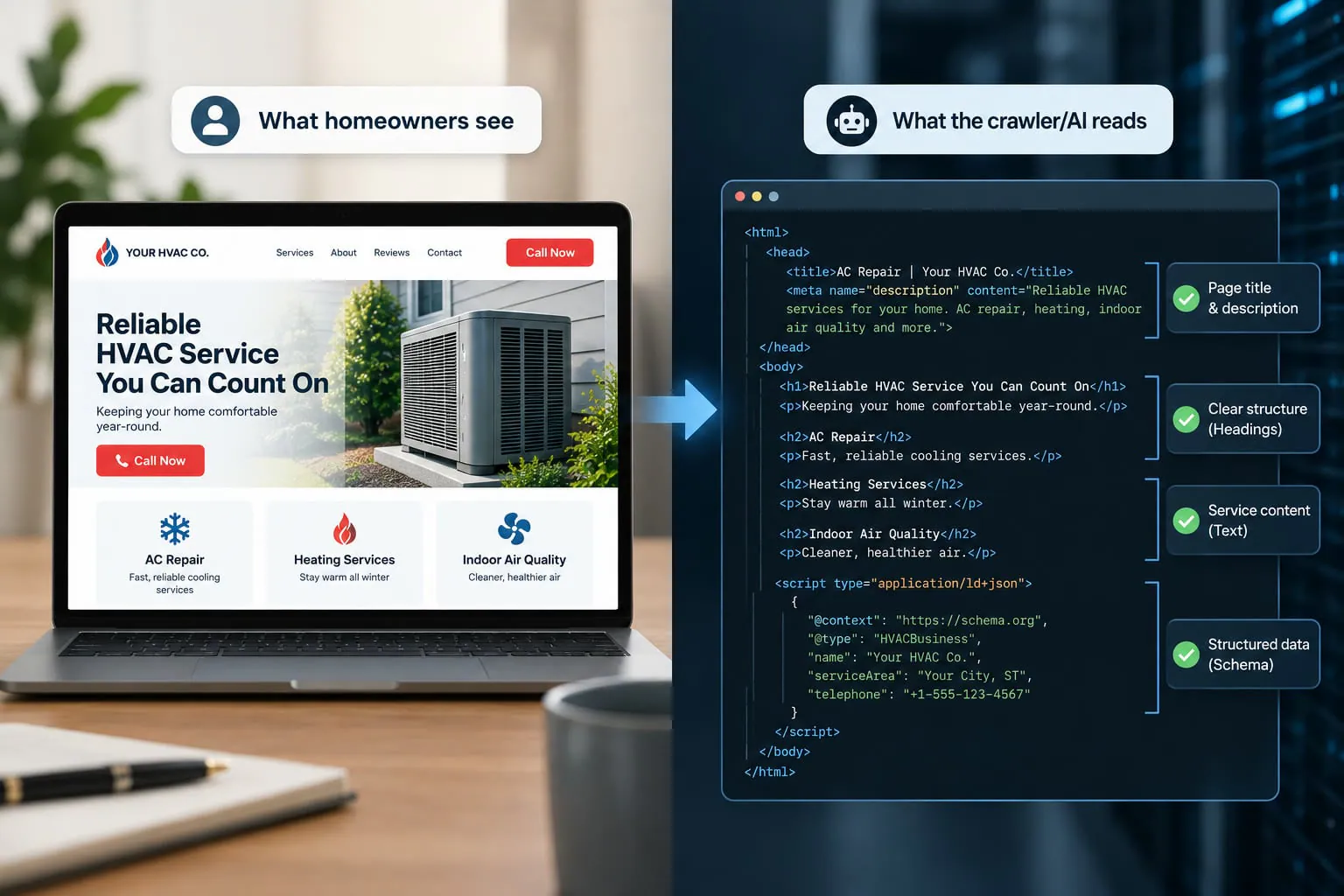
This is the part almost no contractor has checked, and it is the one that decides whether any of your content work matters. An AI system reading your site does not run a browser the way a person does, so a page that looks complete to you can arrive at the machine as an empty shell.
Is your content in the page, or assembled after it loads?
Some website builders send a nearly blank page and then draw the content in with JavaScript. Your visitor never notices. A crawler that does not execute that code sees almost nothing.
- Check it yourself in ten seconds. Right-click any service page, choose View Page Source, and use your browser’s find function to search for a sentence you can see on the page. If the sentence is not in the source, the machine may not be getting it either.
- Text baked into images is invisible. Service lists, certifications, and pricing set inside a graphic read as nothing. If it matters, it belongs in text.
- Content hidden behind a tab or accordion usually survives, but content that only loads when you click does not. Anything essential should be in the page from the start.
Are you accidentally blocking the AI crawlers?
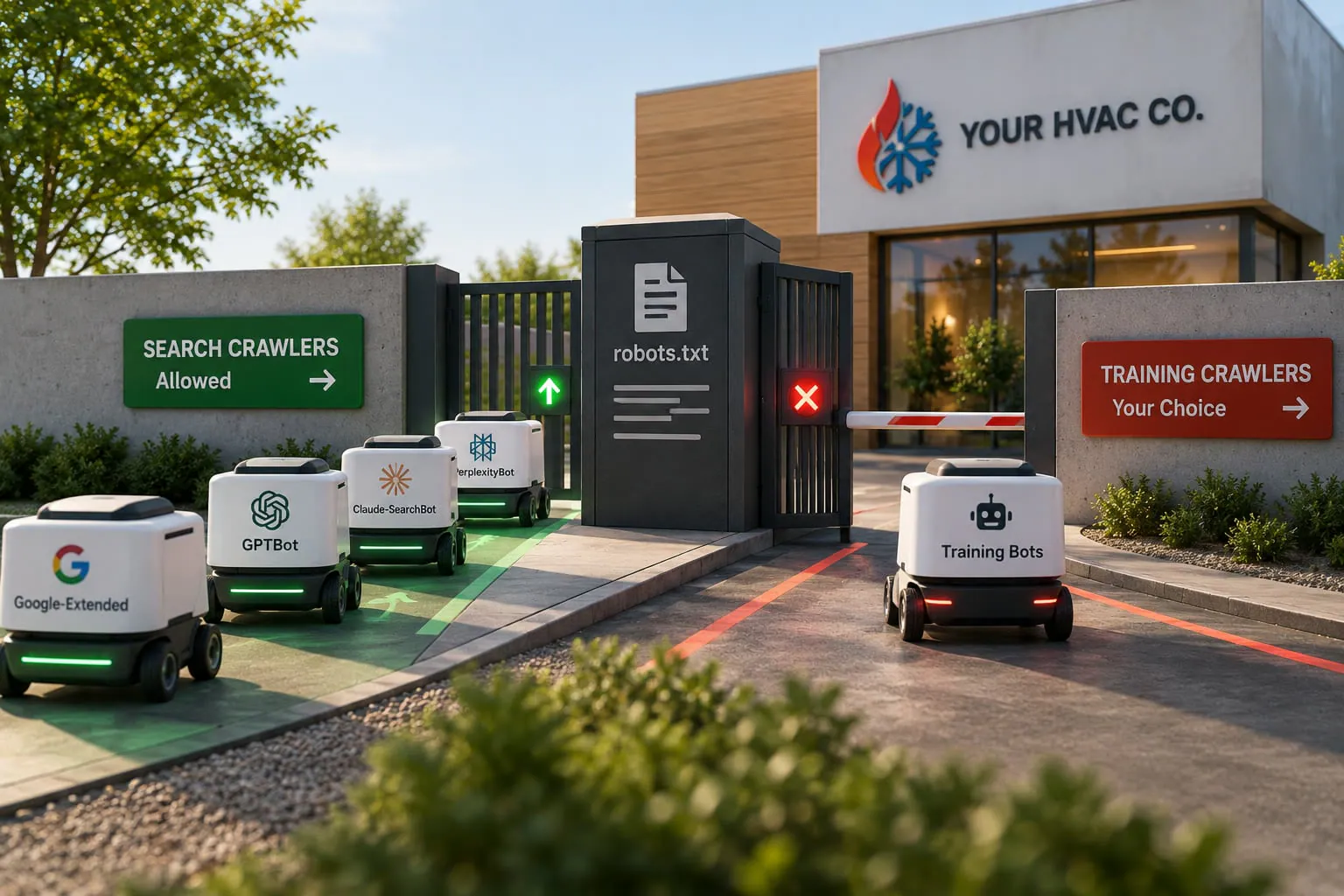
In 2023 and 2024, a wave of plugins, hosts, and security tools started blocking AI bots by default, and a lot of sites are still carrying those rules. One audit of B2B sites in early 2026 found 41% still blocking at least one major AI crawler, usually left over from that panic and usually unknown to the owner.
The important detail is that training crawlers and search crawlers are now separate, so this is not an all-or-nothing choice.
- Training crawlers (GPTBot, ClaudeBot, Google-Extended) collect content used to build models. Blocking these is a legitimate business decision.
- Search crawlers (OAI-SearchBot, Claude-SearchBot, PerplexityBot) fetch pages so the assistant can cite you in an answer. Blocking these removes you from AI recommendations entirely.
Our own robots.txt allows every major AI crawler and disallows exactly one, Bytespider, which is the bot most widely reported to ignore the rules anyway. Type your domain followed by /robots.txt into a browser and read what yours says. It takes a minute, and most contractors have never looked.
What is an llms.txt file, and what does it do?
An llms.txt file is a plain-text page that points AI systems at the content you most want them to use. It is not an access control; it does not force anything, and adoption is still early. It is a signpost, not a gate.
What it does well is give a machine one clean, current, unambiguous summary of who you are. It exists because an AI assembling an answer about you should not have to reconstruct the basics from fifteen scattered pages.
See How We Get HVAC Companies Into AI Answers
Does Your Site Answer Questions or Describe Services?
Once a machine can reach your pages, the next question is whether there is anything on them worth quoting. A page that describes what you offer gives a machine nothing to lift. A page that answers what a homeowner asked gives it a sentence it can use.
The short version for a website audit is three checks.
- Every service you sell has its own page, not a shared page listing six services in bullet form.
- Every page opens with an answer, not with a welcome sentence about your commitment to quality.
- Your name, address, and phone appear as text on every page, matching your Google Business Profile exactly.
How Do You Test All of This in Thirty Minutes?
You do not need an agency to find out where you stand. You need a phone, a laptop, and half an hour.
- Run your homepage and two service pages through PageSpeed Insights. Use the mobile tab and read the field data at the top, not the lab score. The field data is what visitors to your site experienced.
- Open your site on your own phone, on cellular, with wifi turned off. Count the seconds to something readable. This is the test that changes minds, because it is the first time most owners see what a customer sees.
- Try to book yourself a job from the phone. Tap the number, fill the form, do the whole thing. Most contractors find at least one broken step.
- View the page source on a service page and search for a sentence you can see on screen. Missing means a rendering problem worth raising with whoever built the site.
- Read your robots.txt. Your domain, then /robots.txt. Look for any Disallow line under an AI crawler you want citing you.
- Search your own site for your phone number as text. If it only appears inside images or a logo, that is a same-day fix.
Write down what fails. That list, in that order, is your work order.
Want to Know If Your HVAC Website Is Ready for Both Readers?
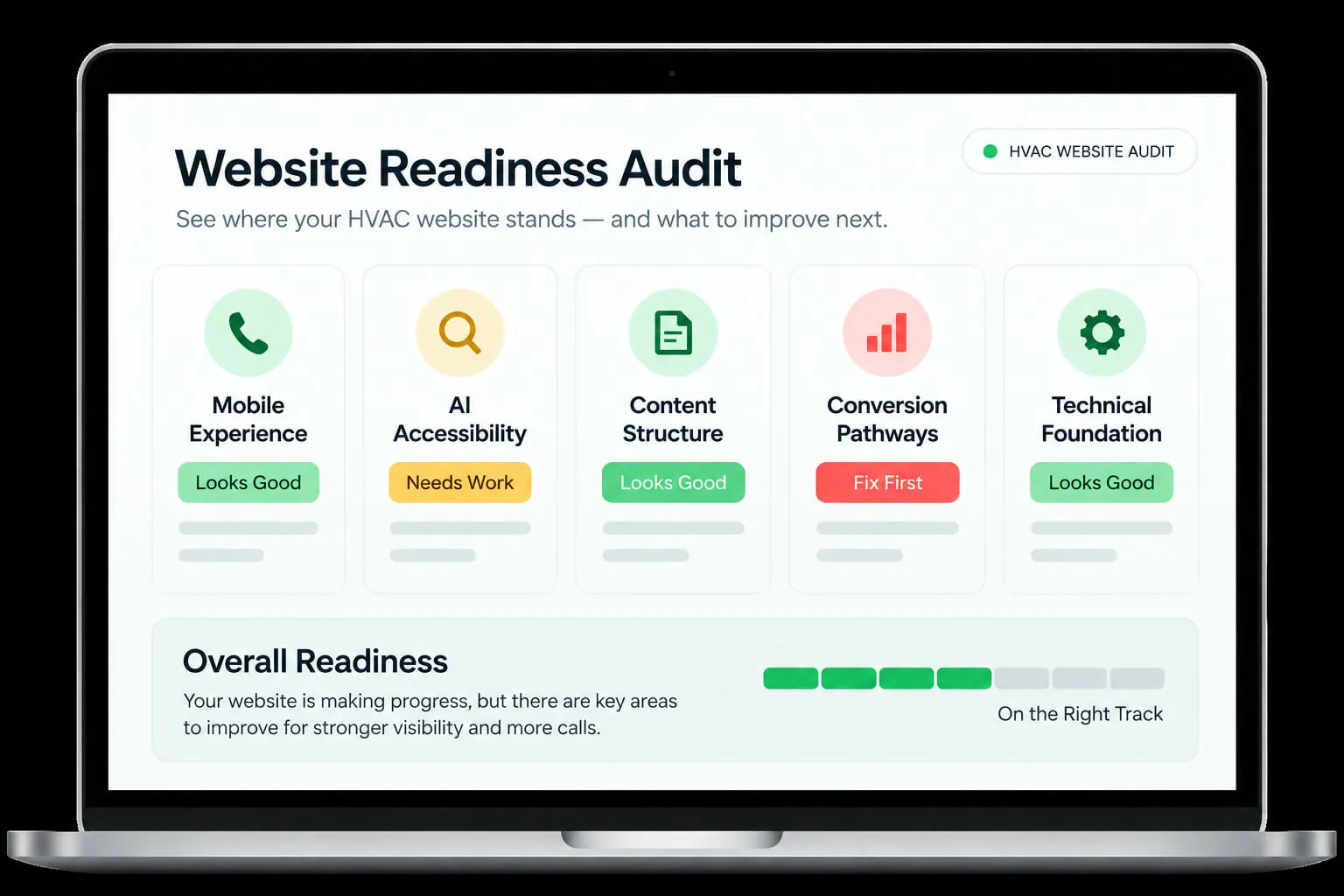
Your website has to pass two very different tests: a homeowner needs to find what they need and call you quickly, while search engines and AI systems need to be able to access, understand, and trust the content.
We turned those checks into a 2026 HVAC Website Readiness Audit you can run yourself.
The 2026 HVAC Website Readiness Audit
What Should You Fix First on an HVAC Website?
Not every fix is worth the same, and the cheapest ones are usually the most overlooked. This is the order we work in.
| Fix | Effort | Who owns it | What it changes |
|---|---|---|---|
| Unblock AI search crawlers in robots.txt | 15 minutes | Developer or host | Eligibility to be named in AI answers |
| Phone number as tappable text on every page | 1 hour | Developer | Mobile calls, and machine readability |
| Compress and resize hero images | 2 to 4 hours | Developer | Load speed on the pages that matter most |
| Remove the homepage slider or video | 1 hour | Developer | Faster first load, fewer distractions |
| Reserve space for late-loading elements | Half a day | Developer | Stops the page jumping under a tapping thumb |
| A dedicated page per service | Ongoing | Writer or agency | Both rankings and AI recommendations |
| Publish an llms.txt or equivalent page | Half a day | Writer and developer | A clean, current summary for AI systems |
| Schema markup across service pages | 1 to 2 days | Developer | How machines read your business details |
The pattern is that the top half of this table costs a day and is sitting undone at most contractors, while the bottom half is ongoing work that never finishes. Do the top half first.
See How We Handle Hosting And Maintenance
When Is an HVAC Website Beyond Fixing?
Some sites cannot be optimized into shape, and spending twelve months trying is more expensive than admitting it early.
- The platform is the ceiling. If your builder cannot compress images, edit robots.txt or add schema, no amount of work inside it will clear the bar.
- Every page shares one template. A site where you cannot add a genuine service page is a site that cannot grow in search or AI.
- The fixes outnumber the pages. When the audit list is longer than the site, you are rebuilding either way, and doing it deliberately protects your rankings.
That decision has its own logic, and our detailed guide on whether to optimize or rebuild walks through it properly, including how to keep your existing SEO through a rebuild. What a website rebuild costs is a separate question with a wide range of answers.
What a Faster, Readable Website Will Not Do
We would rather set the expectation now than have it land as a disappointment in month three.
- It will not fix a thin site. A fast website with four pages is a fast website with four pages. Speed makes existing content perform; it does not create content.
- It will not outrank a stronger competitor on its own. Core Web Vitals are a tiebreaker between closely matched pages, not a substitute for relevance, reviews, and links.
- It will not book jobs by itself. A site that loads in one second and sends every lead to an inbox nobody watches is still a leak.
- It is not finished. Plugins, images, and platform updates undo speed work steadily, which is why this is a quarterly check rather than a project.
So Where Should You Start This Week?
The website that wins Google and AI rankings is not the best-looking one. It is the one that loads before a hot, impatient homeowner gives up, and that a machine can read from top to bottom without a browser.
If you do nothing else after reading this, do these three:
- Open your site on your phone with wifi off. Count the seconds. This costs nothing, and it usually settles the argument.
- Read your robots.txt. One minute, and it tells you whether you are eligible to be recommended at all.
- Fix the phone number. Text, tappable, on every page. It is the shortest path between a fast site and a booked job.
Your website is either your hardest-working salesperson or a billboard in the desert. The difference is rarely how it looks.